Normal view

Remember Musk’s Suit Alleging a Conspiracy Between Apple and OpenAI?

13 July 2026 at 17:24

Ashley Belanger, reporting for Ars Technica back in August 2025:

After a public outburst over Grok’s App Store rankings, on Monday, Elon Musk followed through on his threat to sue Apple and OpenAI.

At first, Musk appeared fixated on ChatGPT consistently topping Apple’s “Must Have” app list — which Grok has never made — claiming Apple seemed to preference OpenAI, an Apple partner, over all chatbot rivals. But Musk’s filing shows that the X and xAI owner isn’t just trying to push for more Grok downloads on iPhones — he’s concerned that Apple and OpenAI have teamed up to completely dash his “everything app” dreams, which was the reason he bought Twitter.

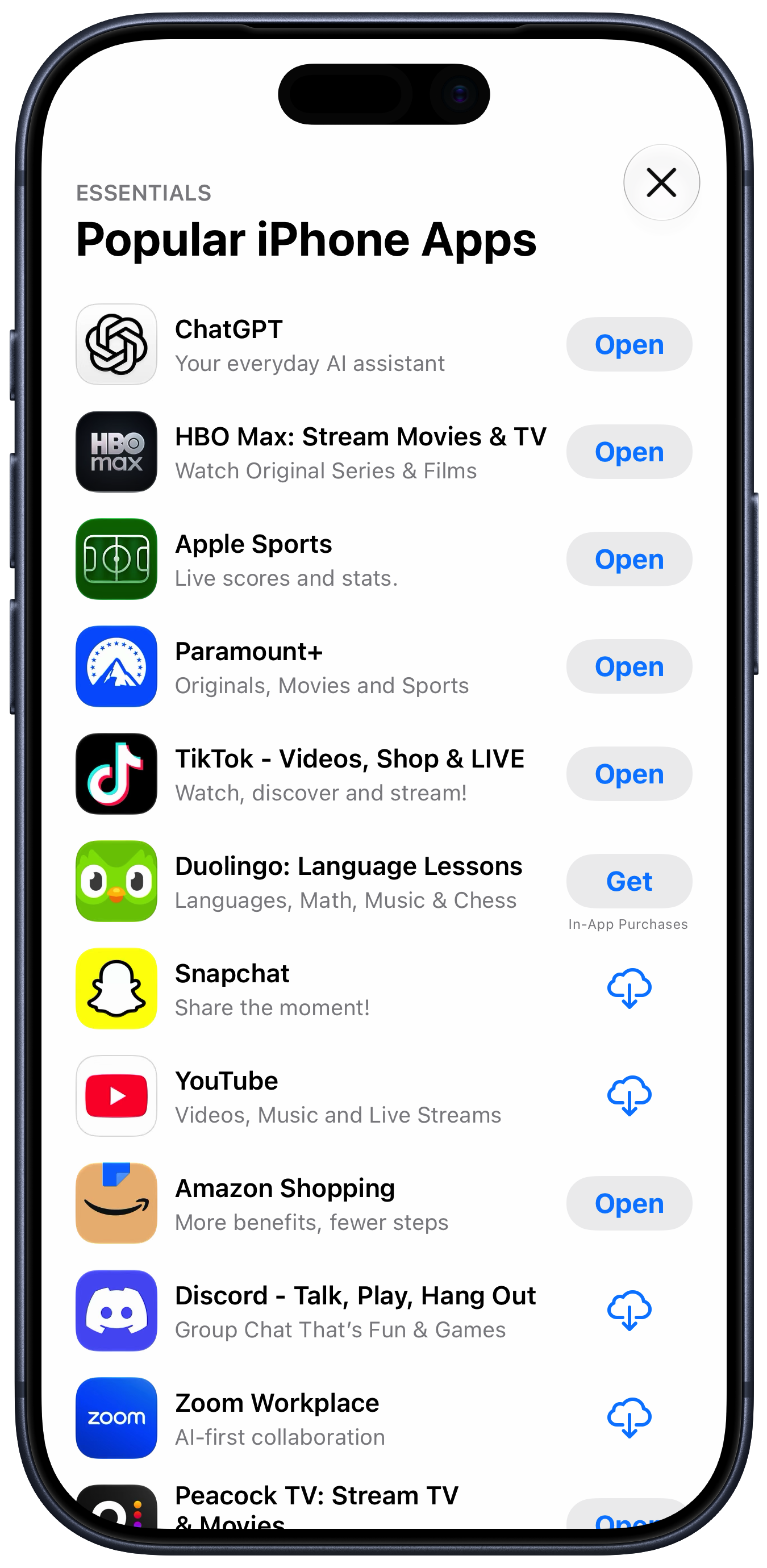
For what it’s worth, I just looked at the App Store editorially-curated “Popular iPhone Apps” list, and ChatGPT is in the top spot. Given the lawsuit Apple filed against OpenAI last week, I’d say this is pretty good anecdata that these editorial decisions in the App Store aren’t driven by favoritism. The top 10 downloads list for free iPhone apps currently looks like this (for me here in the U.S. App Store):

  1. Paramount+
  2. Netflix Game Controller
  3. ChatGPT
  4. Kalshi: Trade the World Cup
  5. Peacock TV: Stream TV & Movies
  6. Netshort - Popular Dramas & TV
  7. Threads
  8. TikTok Pro - Events
  9. Freecash - Get Paid Real Money
  10. Depop - Buy & Sell Clothes

There are some real winners on that list. But only one AI app: ChatGPT.

Musk alleges that the top downloads list is crooked too. That’s just projection. If Musk ran a popular App Store he’d put his thumb on the scale to make sure his own apps always top the list. That’s what he’s done with his personal account, and accounts aligned with his politics, on Twitter/X. Because that’s what he would do, he thinks that’s what Apple does. I really do think he believes the App Store’s top download lists are fixed, and that Grok is on the wrong side of the fix. Crooks think everyone is crooked. It’s just one of several ways that Musk is not hooked up right.

I suspect, though, that he’s no longer worried that Apple is putting its thumb on the scale to favor OpenAI. Maybe he should never-mind this lawsuit.

WorkOS Pipes

13 July 2026 at 00:17

My thanks, once again, to WorkOS for sponsoring DF last week. Users expect apps and agents to reach the tools they already work in. Every integration that gets you there is a different OAuth flow, a different token lifecycle, and weeks of infrastructure before you write a line of product code.

WorkOS Pipes handles it with one API call. Pre-built connectors for GitHub, Slack, Salesforce, Google Drive, and more. Pipes handles OAuth, token refresh, and credential storage. You call the real provider API with a fresh token, every time.

Connect to 100+ providers with WorkOS Pipes.

Paulo Andrade: ‘A WWDC 26 Update on Building a Mac-Assed App With SwiftUI’

12 July 2026 at 23:18

Paulo Andrade:

My last post on using SwiftUI to build a Mac-assed app got a bit more traction than I expected. It was mentioned on Mastodon several times, included in iOS Dev Weekly, inspired May’s edition of the Swift Blog Carnival, and was eventually mentioned by John Gruber, arguably the person most to blame for popularizing the term “Mac-assed”, on Daring Fireball.

All this attention also resulted in an engineer from Apple reaching out with some notes. We exchanged a few emails, I filed a few radars, and now that WWDC 27 is behind us, this post serves as a small update to the issues I wrote about before.

There’s real progress here, but I think my main point still stands: SwiftUI is now seven years old and it does not make it easy to create great Mac apps.

How UIs Degrade Over Time

12 July 2026 at 21:51

These examples are from Windows, but the same degradation is true for the standard look for MacOS alerts too. There was a time when system UI chrome was improving in clarity, everywhere. Today we live in an age when it’s degrading in clarity, everywhere. It’s rather inexplicable.

‘Every Frame Perfect’

12 July 2026 at 21:48

Nikita “Tonsky” Prokopov:

The rule of thumb is:

If I take a screenshot of your app at any moment, you should be able to explain what I see.

Why care about every frame? It builds trust. Users can’t see the code, so UI is the only way for them to judge the quality of the app. If UI looks good, that means developers had time to polish it, which means that they probably spent a comparable amount of time to iron out the code. It’s a heuristic, but a reasonable one.

Now, what does it mean in practice? I can think of a few things:

  • No white flashes between screens.
  • No partially loaded content.
  • No relayout while content loads.
  • Internally consistent. If one part of the UI says “1 update available”, another part should not say “Checking for updates...”
  • Precise animations.

Animations often end up being forgotten. A UI might look great in both start and end states but very janky in between.

“Every frame perfect” is a great mantra for UI craftsmanship. If you care about every frame, that discipline will be palpable, even though almost no users will ever examine your animations and transitions frame-by-frame, and most will happen too quickly to see in real time. If you cut corners on interstitial states “because no one will notice”, you’ll start cutting corners elsewhere.

TwoMillionKit: Use Private Cloud Compute in MacOS 27 Foundation Models Without an Entitlement

12 July 2026 at 20:04

Guilherme Rambo:

Apple ships the fm command-line tool in macOS 27, which can be used to run inference with the local system model or Private Cloud Compute from Terminal or scripts. You know what else can run command-line tools? Mac apps! 😃

I decided to spend some of my Codex tokens and take GPT 5.6 Sol for a spin. I asked it to create this Swift package. All it does is provide a LanguageModel implementation that uses the fm command-line tool under the hood, meaning that any Mac app can use the Private Cloud Compute model without requiring a special entitlement from Apple.

The main limitation is that this will not work for sandboxed Mac apps, so any Mac app distributed via the Mac App Store won’t be able to use it.

But for developers of Mac apps distributed outside the Mac App Store, this provides a simple and entitlement-free way to use Private Cloud Compute in their apps.

Use sparingly and at your own risk.

This is a workaround for Apple’s current limitation that only grants access to Private Cloud Compute to “developers in the App Store Small Business Program with fewer than two million first time App Store downloads”. Hence Rambo’s clever name for the framework.

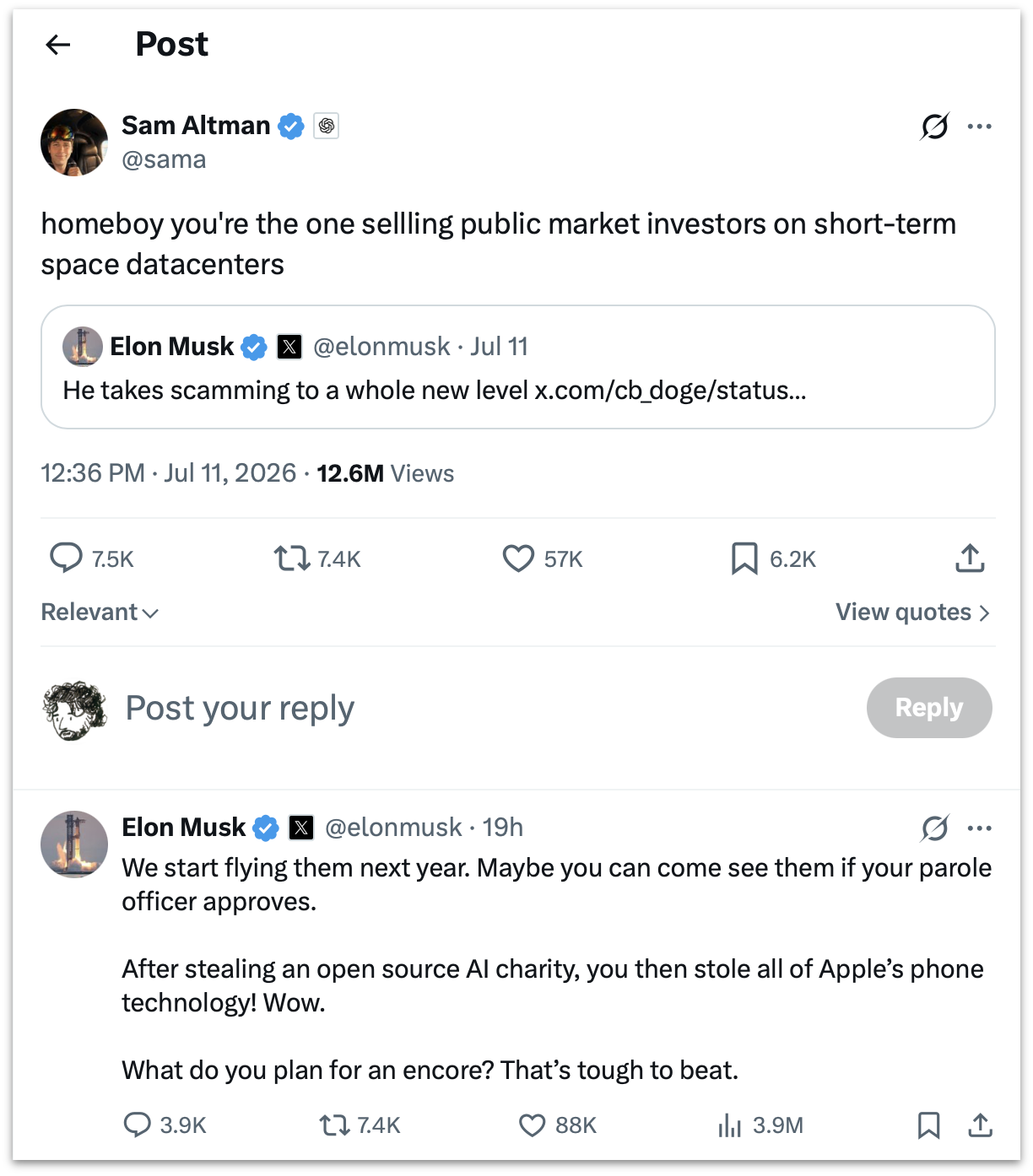
Sam Altman and Elon Musk Argue Over Who’s Running the Bigger Scam

12 July 2026 at 19:45

Elon Musk, linking to his own tweet from March that “Sam Altman is super good at scamming”:

He takes scamming to a whole new level

Sam Altman:

homeboy you’re the one sellling public market investors on short-term space datacenters

Musk:

We start flying them next year. Maybe you can come see them if your parole officer approves.

After stealing an open source AI charity, you then stole all of Apple’s phone technology! Wow.

What do you plan for an encore? That’s tough to beat.

(All spelling, capitalization, and punctuation sic.)

These are two of the CEOs of the most valuable companies on the planet. Say what you want about it, but Musk’s Twitter/X is like nothing else that’s ever existed. Screenshot of the thread for posterity, and an XCancel link for those icked by X itself.

Lunacy — Jeff Halter’s Lunatic Fringe Player

12 July 2026 at 19:19

After linking to Stacks, his remarkable new modern HyperCard player, I made the terrible mistake of clicking around the rest of Jeff Halter’s website, and fell upon Lunacy:

Created by Ben Haller and released in the early ’90s as part of the Macintosh More After Dark software package, Lunatic Fringe was unique among screensavers in that it was not just a passive animation to watch, but an interactive game! Toggling the Caps Lock key while the screensaver was running popped you into a space shooter where you could fly around, collect power-ups, and blast a variety of baddies all in pursuit of a high score. It was a blast.

Running Lunatic Fringe on a modern computer has been a challenge. Fringe Player by Greg Parker filled this need during Apple’s PPC and Intel era, but is not supported on modern Apple platforms. Lunacy brings Lunatic Fringe to the present: a native Swift app with a built-in emulation engine that runs the original module, unchanged, on modern Apple platforms.

Lunatic Fringe is one of my all-time favorite classic Mac games. Lunacy is a great modern player, including CRT simulation to make the game look a lot more like it did back in the day.

Stacks — HyperCard Player for Modern MacOS

12 July 2026 at 17:42

Well this is just delightful:

  • Run HyperCard stacks directly on your modern Mac. No emulator required!
  • Browse the Internet Archive’s HyperCard collection and run stacks with one-click.
  • Period-accurate typography.
  • Sound, instruments, and MacinTalk speech synthesis.
  • Cross-stack navigation.

Stacks is a really beautiful native Mac app, and its presentation of classic HyperCard stacks is exquisitely faithful to the era. It’s simultaneously Mac-assed 2026-style and Mac-assed 1987-style. Crackerjack work from developer Jeff Halter.

Can Someone Explain to Me How to Get ‘ChatGPT Classic’?

12 July 2026 at 00:38

One more link from OpenAI’s Help Center, this one explaining how to upgrade from the old Mac app to the new “super” app version:

Follow the prompt in the app to download the new ChatGPT desktop app. Then sign in with the same ChatGPT account.

The new app may install alongside your current app. If both remain installed, you will see:

  • ChatGPT: The new app with Chat, Work, and Codex.
  • ChatGPT Classic: The previous ChatGPT desktop app. You can continue using it; no migration is required at launch. It continues to receive model updates, bug fixes, security patches, and support for its existing Enterprise capabilities. New agent features may be available only in the new app.

None of this has been my experience. I had the existing old ChatGPT app installed on three different Macs. On all three of them, the built-in “Check for Updates” command only installs the latest version of the classic app. This is good, I suppose. But if you’re not aware from following the news that OpenAI released an altogether new “super” app for MacOS and Windows, you’d never know it from the Check for Updates command built into the classic Mac app.

So I don’t see “the prompt in the app to download the new ChatGPT desktop app”. If I download the new app manually, I get a disk image. After mounting the disk image, the instructions say to double-click the “ChatGPT” app on the disk image — not to drag it to the Applications folder. If I do that while the old ChatGPT app is still running, it bounces back and forth a few times but nothing new gets installed and nothing old gets removed or renamed. I’m just left with the classic ChatGPT app, still named “ChatGPT”.

If I run the installer on the disk image when the old ChatGPT app is not running, the old app gets replaced by the new one in my Applications folder, and the old app is moved to the Trash. There is no app named “ChatGPT Classic”.

I mean, their Help document does say “the new app may install alongside your current app”, and “if both remained installed”, so they seem just as confused as I am. And while you can, for now at least, just remain on the old version of the app and still get model updates and bug fixes, there is seemingly no way to download a new copy of the classic ChatGPT Mac app if you don’t already have a copy. The update installation is seemingly non-deterministic.

This is an app with over a billion users. I know there aren’t a billion users of the native Mac app, but, still. It’s one of the most popular apps any company has ever made, and the biggest update they’ve ever shipped is an incoherent confusing mess.

OpenAI Help Center Describes What Is Wrong With the New ChatGPT

12 July 2026 at 00:24

OpenAI Help Center, “Where Work and Codex are available”:

Work is available on ChatGPT web and mobile for eligible paid plans. Work is also available in the ChatGPT desktop app when included for your plan and workspace.

Work on web and mobile runs in the cloud. Work in the desktop app can also use local files and desktop apps with your permission. At launch, cloud Work conversations do not appear in desktop Work; desktop Work threads and local files remain on that computer.

Codex is available as a mode in the ChatGPT desktop app. It can work with local folders, repositories, terminals, and developer tools. Codex is not a selectable mode on web or mobile. You can access supported desktop Codex tasks from the Remote tab in the ChatGPT mobile app, but those tasks do not become web or mobile chat history.

These three paragraphs, from OpenAI’s own Help Center, sound more like a critic’s scathing review of what’s wrong with the new ChatGPT “super” app than a guide to how to use it.

Benedict Evans on the New ‘Super App’ ChatGPT

12 July 2026 at 00:16

Benedict Evans with a succinct review on Threads:

Wow, what a total mess.

What is the difference between a project, a task and a chat?

Why did chats get a crappy floating window but tasks and projects don’t?

Why does choosing ‘plugins’ get me ‘templates’?

Am I not allowed to finish ‘setup’ if I don’t use Slack or Google Drive?

I forget how I made the Setup dickbar disappear despite my not using Slack or Google Drive. It was confusing.

It is sometimes observed that in companies dominated by internal politics, their shipped product (and public keynotes) reflect the company’s org chart. That’s never been truer than with the new ChatGPT app. OpenAI’s internal org chart is a complete disorganized mess. This new app perfectly reflects that.

The old ChatGPT app was focused. That’s the app that still ships for mobile (which includes iPad, which tells you whether OpenAI thinks iPad is a real computer or a big iPhone), and is, for some Mac users, left installed on their systems as “ChatGPT Classic”. The new app is an incredibly confusing sloppy mess. At a glance it looks like a polished app. But the UI is just slop. It has the veneer of a polished app without actually being organized or structured or labeled in ways that add clarity and coherence. It’s playing dress-up as a big-boy app. My understanding from people adjacent to OpenAI is that the company’s senior executives are singularly consumed with FOMO obsession regarding Anthropic, and the only real clout within the company belongs to the AI researchers. Not product designers or app craftspeople. What the researchers say goes, and with this update, we can see their level of taste in app design.

The app icon for the new “super” app should be the Homer.

★ Exactly Like Om Malik

11 July 2026 at 21:43

Fred Vogelstein (Om’s partner at Crazy Stupid Tech):

We met a week later at his outdoor office — a bench in SF’s South Park. He told me that he was going emeritus at True Ventures, the VC firm, and that he was going to spend more of his time writing.

It was awesome to see him. Sitting on a bench with Om could be quasi religious. He talked so softly and deliberately that it forced you to slow down, lean in and forget about everything else.

What became clear was that we actually saw the world the same way. We didn’t agree what Wired should be doing about it. But we did agree on this: While everyone was fixated on big tech, an explosion in tech innovation not seen in a generation was taking place. We both agreed that not enough people were writing about it.

“Maybe we should do something together then,” I said.

Joanna Stern:

So saddened to hear about @om. His writing was one of the reasons I went into tech journalism. Right out of college, I was working at a PR agency and started reading his site. It inspired me to start blogging.

Years later, he tried to recruit me. Even after I went elsewhere, he’d send me notes telling me how proud he was of my work. He’d often review my reviews, so here’s mine of him: Generous with his time. Honest with his feedback. Endlessly encouraging to those coming up behind him.

Casey Newton:

Very sad to hear about the passing of @om. He shared two lasting lessons with me: the first when I was a cub tech reporter at the SF Chronicle; he interviewed me for a job but told me he didn’t think I could hack it at GigaOm because newspaper writers were too slow. It taught me that I needed to get out of print media ASAP.

The second was many years later, when I was having a drink with him and some other reporters. We asked him for advice. “Never name a blog after yourself,” he said. RIP

Jim Nielsen:

One day on Twitter I got a DM from someone with the handle @om.

“I don’t know who this is,” I thought, “but damn that is a great handle!”

Then I peaked at the follower count: over 1 million!

“WTF? Who is this???” I thought.

I’d never — then or since — been contacted by someone with such a high profile online.

How was I even on this person’s radar?

Om seemingly read everything.

MG Siegler:

Looking at my emails and social media messages from back then is just a treasure trove. Om was always quick with a compliment about something I had written but also with a criticism at times. He clearly just read endlessly and couldn’t help but share his opinions, even if privately. In person too he was amazingly candid and honest. He would complain how annoyed he was if you beat him to some story — but complain even louder if he felt like he actually beat you but wasn’t getting enough credit. He was clearly competitive too. And he was correct in his assessments, because again, he was honest. [...]

To me, Om was and will always be such a singular individual. There will never be anyone quite like him. He’s the only person I know who could be both humorously downtrodden and insanely optimistic at the exact same time. Again, he just seemed to wear his emotions on his sleeve.

Jason Hiner, in a post on LinkedIn:

This is the opening anecdote from “Chapter Six: The Blogger” from my 2016 book, Follow the Geeks, co-authored with Lyndsey Gilpin. Om once told me that “For three years, it was every day a rejection” as he tried to break into tech journalism. This was how he finally broke through.

David Churbuck checked his voicemail. There was a message from someone looking for a job.

Because of the guy’s thick Indian accent, David could barely make out what he was saying, except that he worked for a wire service down on Wall Street and was a big Forbes fan. The guy heard that Forbes was going to be one of the first media companies to launch its magazine on the web and he wanted to come help.

David ignored the message. He had a small team and hardly any budget.

Then he got a fax. It was from this guy, explaining why he was a perfect fit to join the team.

The next day, the guy left another message. If David would just give him a call, it would be great to talk with him. He wouldn’t regret it.

Ignore.

The following day, he left another. Whatever time limit there was for voicemails, this guy always used up every minute.

Still, David ignored it.

And then the guy started getting creative.

[...]

One of the journalists, Michael Noer, said half jokingly, “Just call the guy in!” So, partly out of admiration, and partly out of pure morbid curiosity, David called him back.

One interview. Fifteen minutes. That was all it took for David to hire Om Malik.

“They do not sell themselves”, Om told me in a separate story from that same time in his life.

Hiner made the entire chapter available to read as a handsome PDF. It’s so good, and so utterly Om. It’s a crackerjack good read about the very early “WWW” days of the web. A bit:

Om is charming and disarming, forceful and accommodating. He has an easy smile, a quiet, melodic voice, and a handsome face. Once he opens his mouth, it’s obvious how much he reads and how thirsty he is to learn. It’s rare to meet someone who is ready to debate you on almost any topic, but who’s also genuinely curious about your life and your opinion. It all makes the burly journalist one of the most huggable people on Earth. That’s what David was up against when he met Om. He didn’t stand a chance.

“It was destiny,” said David, with a self-deprecating laugh. “It was total destiny.”

Om’s close friend, photographer Christopher Michel, published “Om the Great”, an enormous gallery of portraits of him. Here’s just one of hundreds:

July 2024 portrait of Om Malik, holding a camera, by Christopher Michel.

Lastly, here’s a story from Andrew Sasaki, which he sent me by email, and I’m reproducing with his permission. It’s the perfect Om story:

I met Om briefly at a tech event in NYC around 2008 or so. He was talking with a friend of mine, and when I walked up he introduced himself: “Hi, I’m Om.”

“‘Om’ like ‘Om Malik’?” I asked.

This amused him greatly.

“Yes, exactly like Om Malik”, he said.

A couple of years later the iPad had just launched, and I saw my friend again at another industry event. I asked him a question related to the unprecedented development effort we were already seeing around the new platform that didn’t yet have a single compelling use case.

“You know who I bet would know about that? Om Malik”, he said, and gave me Om’s email address.

I hesitated to bother Om, but eventually reached out with my question. “I don’t know if you remember me, but we met a couple of years ago, and…” blah blah blah.

Naturally, there was no answer. Why would there be? He doesn’t know me from Adam, and he’s Om Fucking Malik.

Except there was an answer about 4 days later. Om started off by apologizing for the delay in responding, but he had taken the time to research his answer before writing to me. And of course, his answer was thoughtful, insightful, and absolutely correct. I was gobsmacked at the generosity he had shown replying to someone he didn’t even know. He gave no indication that he even remembered me until his signature line:

“Exactly Like Om Malik”

Gurman on Tang Tan and Paul Meade

11 July 2026 at 20:02

Mark Gurman, reporting for Bloomberg (paywalled, alas):

Apple was quickly alarmed by OpenAI’s recruiting drive, which included poaching senior hardware and design leaders and ravaging several teams across its engineering organizations. The practice continued as recently as June, when OpenAI lured away Apple’s smart glasses chief. That executive, Paul Meade, was quickly shown the door at Apple and not given the opportunity to stay on for a transition period, according to people with knowledge of the matter.

Regarding Tang Tan, who is at the center of Apple’s lawsuit:

Tan was famous for taking risks at Apple and “flying very close to the sun” during his 25-year career, according to someone who worked with him. “Tang is well known for moving fast, playing fast and loose and breaking things,” said the person, who asked not to be identified while discussing former colleagues.

Gurman broke the story of Meade leaving Apple for OpenAI on June 26, writing then:

Meade’s departure is a blow to the iPhone maker. He has led hardware engineering for the Vision Pro headset — once seen as Apple’s next major computing platform — for seven years. Apple and OpenAI spokespeople declined to comment. He has also been responsible for the development of display-free Apple smart glasses meant to vault the company into the AI wearables space next year and compete with a growing category pioneered by Meta Platforms Inc.

‘No Interest’

11 July 2026 at 05:41

Drew Pusateri, director of communications at OpenAI, on Twitter/X (or XCancel):

Our statement in response to this suit: We have no interest in other companies’ trade secrets. We remain focused on building innovative technology that empowers people everywhere.

Let’s say I think you stole my wallet. I approach a police officer and tell him my suspicion and describe the evidence that makes me think you have my wallet in your pocket. “Is that his wallet in your pocket?” the cop asks.

“I have no interest in other people’s wallets” would be a rather curious answer.

Ice Cold

11 July 2026 at 05:14

Alex Heath, on Threads:

At WWDC, Apple execs I met with were ice-cold when I asked about their OpenAI partnership.

Now we know why: Apple just sued OpenAI for allegedly stealing trade secrets related to consumer hardware (Apple and OAI senior leaders are in Sun Valley this week. Yikes!)

I noticed the same ice-cold reaction to my questions about ChatGPT and Siri. (In fact, I think Heath and I even talked about it together when we bumped into each other at the end of the day on Monday during WWDC week.) At the time I took it as Apple execs not wanting to distract from the fact that Siri AI with Apple Intelligence, with no third-party plug-in, was truly competitive. But in hindsight their coolness, I think, was about this.

There was no response like, say, “We think ChatGPT is great and we’re happy to keep it available in iOS 27 as an option for our customers who love that experience, but the new Siri AI truly stands on its own.” That’s a typical Apple answer. But what they actually said was just more like “The ChatGPT extension remains available.” I didn’t think much of it at the time but now it stands out.

Ryanair Literally Sucks

11 July 2026 at 05:04

The AP:

Fellow passengers pulled back a man who was partially sucked out of a dislodged airplane window on Friday, a few minutes after takeoff on a flight from northern Greece to Germany. The plane subsequently returned to the airport in Greece.

The incident happened on a morning flight from the northern Greek city of Thessaloniki to Memmingen, near Munich, operated by Malta Air, a subsidiary of Ryanair, Europe’s largest budget carrier.

Worse than bad date math.

Newly Renamed Trump Airport in Palm Beach Has an AI Slop Logo

11 July 2026 at 05:01

Frank Landymore, writing for Futurism:

Look past its gaudiness, though, and you’ll notice some things that’re a little off in the finer details. The talons are horribly deformed and shaped differently from each other. The entire legs are uneven, too, and the base of them are represented as a strange conglomeration of blobs, which are also inconsistent. In fact, the whole thing is slightly asymmetrical. The wings have an uneven number of feathers. The two olive branches — another error in itself, because the eagle is supposed to be clutching a bundle of arrows in its right-side talon — have differing numbers of leaves. And the shield only has eleven stripes, as opposed to the thirteen that the actual Great Seal is supposed to feature.

The fourth star is crooked. What a mess. Perfect logo for Trump Airport.

Mac OS 9’s Finder Had a ‘View as Buttons’ Mode

11 July 2026 at 04:10

Cryan.com:

The “View as Buttons” option was a distinctive feature of the Macintosh OS 9 Finder. It allowed users to view the contents of a folder as clickable buttons, each representing a file or application. This view was particularly useful for quickly accessing frequently used programs and documents.

I totally forgot this view existed, despite using Mac OS 9 for many years, because I never used it myself. This didn’t just turn apps into buttons with tiled square backgrounds — it turned every item in the file system into a button. I was reminded of it by a reader who used it in theater class in school to turn a folder full of sound files into, effectively, a soundboard app. Cool.

So many of the best UI ideas are little things like this. Sure, most Mac users didn’t want or need this view. But for those who did, they could do something cool with it.

Squircle Jail Isn’t (Or at Least Shouldn’t Be) About Upcoming Touchscreen Macs

11 July 2026 at 03:58

Another bit of follow-up on squircle jail on MacOS. The most-asked question in my inbox from readers is this: Is mandating the squircle a concession to the much-rumored upcoming touchscreen MacBooks?

No.

The visible shape and appearance of an app icon is unrelated to its clickable — or, perhaps soon, tappable — area. Rendering a visible squircle doesn’t change the shape of the clickable/tappable target area around an icon. In the bygone days when MacOS permitted delicious app icons — and Apple crafted delicious icons for its own apps — you could click in the middle of, say, the QuickTime Player icon and it just worked. It would have been pretty nutty if it didn’t.

Screenshot of the old QuickTime Player’s “Q” icon, with a transparent hole.

❌