❌

Normal view

Unread 5.0

12 September 2026 at 21:27

John Brayton:

Unread 5.0 is available now from the App Store. This update adds these improvements and more:

  • Improvements around hero images, article list thumbnails, and widget thumbnails
  • Syncing with FreshRSS and Miniflux
  • The ability to quickly mark old articles read

I’m a NetNewsWire man personally, but I’ve long admired Unread as a different, very good take on a feed reader. Just a gorgeous app. One of the very best things about RSS is that feed readers take such different shapes and approaches.

Where Are the AI-Generated Killer Apps?

12 September 2026 at 18:23

Paul Ford, writing for The New York Times (gift link):

For a while, I must admit, it looked as if software developer roles like mine were done for. How could we fight against tireless robots? But our industry is slowly realizing that making truly cutting-edge software still requires humans to think and work together, to maximize their skill sets and to practice their respective crafts. A.I. can write very good software, but it also makes it easy to do someone else’s job badly, which is part of why all those projects fail. Now that everyone can code, it’s become clearer why many shouldn’t.

Ford, linking to his own column on Bluesky:

I just want one killer app before we get a killer robot.

Yours Truly on Off Protocol With Jim Ray

12 September 2026 at 17:36

My old friend Jim Ray now runs developer relations at Bluesky, and part of that gig is hosting a podcast, Off Protocol (“a show about building a better Internet”). I was delighted to appear as his latest guest. I generally don’t like talking about my career, but I did enjoy talking about it with Jim. He has that effect on people.

T-Mobile Is Charging $5/Month for iPhone Handoff

12 September 2026 at 17:24

T-Mobile, in their iPhone 18 Pro / iPhone Duo press release:

Plus, T‑Mobile is one of the first to support Apple’s new iPhone Handoff feature, where customers with two compatible iPhone models can use their T‑Mobile number across both devices and choose which phone is active at any given time. The secondary iPhone works seamlessly, including essential T‑Mobile services like calls, texts, data, mobile hotspot, Scam Shield and T-Satellite on eligible plans, allowing customers to get the most from two devices without clunky handoffs or the hassle of managing another number. iPhone Handoff is available on any iPhone with iOS 27 via iPhone settings and ready to use from day one on the new iPhone 18 Pro lineup and iPhone Duo. T‑Mobile is introducing the feature at $5/month.

This seems like a ridiculous thing to charge for. It’s not adding a separate device to your plan, like adding a cellular iPad or even an Apple Watch. It’s just switching your active eSIM between two iPhones. You can do this for free, now, on any carrier via Settings → Cellular — but it takes a bunch of taps, confirmation on both iPhones, and a few minutes for the carrier to register the eSIM transfer. iPhone Handoff just eliminates all the annoying friction and waiting.

But, it’s utterly unsurprising that a carrier will charge a ridiculous monthly fee. I’ll be very surprised (pleasantly) if Verizon doesn’t do the same. Verizon charges for everything.

Still curious to me why AT&T isn’t yet announced as supporting iPhone Handoff at all. I have no idea why anyone remains on that turd of a network unless they live or work in a location where only AT&T provides a good signal, but even then, if it were me, I’d use AT&T by way of US Mobile. AT&T is the worst company I’ve ever dealt with, and I live in Kabletown.

Tristan Buckmaster’s Statement on Getting Scooped by OpenAI on the Navier–Stokes Problem

12 September 2026 at 16:55

Tristan Buckmaster, professor of mathematics at NYU, in his own statement, regarding his and Levent Alpöge’s interactions with employees at OpenAI regarding this week’s math-proof controversy:

I asked when the first prompt had been sent by them. This question was not answered directly by OpenAI for some time. Eventually it was agreed that it had been sent in the past few days, after information about our work had reached OpenAI.

I asked whether the model had been trained on, or had access to, our sessions in Codex, into which we had been putting all our drafts for the whole of this project. I was told the model did not look up user data. I asked again, about training, and I did not get an answer.

Two proposals were offered to me. The first was that we post our Euler result, and that OpenAI post its Navier–Stokes result the next day. The second was that, after posting Euler, I alone write a paper presenting the Navier–Stokes result, acknowledging that an internal OpenAI model had resolved it. Sebastien twice asserted that he wanted Levent removed from authorship, and said it would all be simple if only it were not the case that, and it was so annoying that, Levent works at Anthropic. It was also said that if OpenAI posted after us, they would say that we deserved the Clay Prize, and that we were the “closest humans to the problem”. I declined both offers.

I said that if OpenAI released its result in the way proposed I would go public with what happened. The reply was, “Why would you ruin your career?” I replied that I am an academic, and asked why he thought going public would ruin my career. The reply was, “If you don’t want me to be nice, then I don’t have to be nice.”

“Sebastien” is Sebastien Bubeck, who came to OpenAI by way of Microsoft (shocker).

Gary Marcus on This Week in AI Drama

12 September 2026 at 16:25

I have been busy with new-iPhone-week stuff, so I haven’t been able to follow either of these stories closely, but Marcus summarizes them both well. First: the drama regarding OpenAI claiming a solution to the Navier–Stokes math problem. In short, OpenAI continues to prove itself to be a company full of cheaters. In this case, they seemingly were willing to tank the company’s reputation to first claim the solution to one of mathematics’ top unsolved problems. Apparently they spent $23 million in compute to win a $1 million prize, and admit they used a model that might have trained on the work mathematicians Tristan Buckmaster and Levent Alpöge had been working on for months, who had been using a combination of tools from OpenAI and Anthropic (where Alpöge is employed). With no hyperbole, the message here seems to be “Don’t use Codex or ChatGPT unless you’re OK with OpenAI stealing your work if it’s of interest to them.”

As for Anthropic, the news of the week is this guy Jacob Coxon, who quit the company in a public huff (on X, where most of this public drama is taking place), because he thinks they’re increasingly reckless despite everyone inside Anthropic believing that there’s a good chance LLMs will destroy humanity (or at least civilization?) in the next few years. Here’s Evan Hubinger, still at Anthropic, not dismissing Coxon as an alarmist but agreeing with him:

Jacob is correct here — we really do earnestly believe AI could kill all humans! I personally think it is >10% within the next decade. I believe Anthropic is trying its best, but we do not yet have a plan to solve alignment for superintelligence and are not clearly on track to.

This is crazy talk. Put aside whatever the actual risks are. If you truly believe there’s a greater than 10 percent chance that “AI could kill all humans ... within the next decade”, this is not how a reasonable person in their right mind would talk about it. Coxon thinks he’s blowing the whistle that Anthropic is a threat to the world. What he’s actually done is confirm that Anthropic is a cult, and its employees can’t really be talked to rationally, because they’re cultists. Sometimes members leave cults and they reveal to the world details about what’s going on inside the cult. But a lot of the time you can tell those whistleblowers still aren’t hooked up right, because they’re still people who joined and spent years inside a cult. They leave the cult not because they suddenly snap back to sanity but for other reasons.

Last Year’s iPhone Share Amongst Users of Widgetsmith

12 September 2026 at 02:19

David Smith, developer of the widely-used Widgetsmith, on Mastodon:

The eve of iPhone 18 Pro pre-orders seems a good time to look back at the iPhone 17 family’s adoption. Here’s the 17 family data as a percentage of overall usage for Widgetsmith.

Generally they followed the usual adoption pattern, and overall did very well ending at around 20% of total usage.

With the exception of the Air really struggling to find market share. For comparison the 16 Plus ended its first year at around 1.4% (vs the Air’s 0.3%).

The chart looks rough for the iPhone Air. Amongst all Widgetsmith users, here’s the share as of September by model:

        iPhone 17   7.2%
iPhone 17 Pro Max   5.9%
    iPhone 17 Pro   5.8%
       iPhone 17e   0.5%
       iPhone Air   0.3%

But if we only consider the 19.7 percent of Widgetsmith users using one of these new 17-generation iPhones, the percentages look like this:

        iPhone 17   36.5%
iPhone 17 Pro Max   29.9%
    iPhone 17 Pro   29.4%
       iPhone 17e    2.5%
       iPhone Air    1.5%

In the entire year since the iPhone Air was announced, I’ve never seen Apple advertise it. No billboards, no commercials. It raises a chicken/egg question: did no one buy it because Apple didn’t market it, or did Apple not market it because no one wanted it?

It’s a shame, because I truly believe not only that it’s the nicest iPhone Apple has ever made, but that if most people tried it, they’d love it. They don’t need a bigger battery and, wouldn’t take better photos with a Pro model, and would love the thin feel and low weight. But the shame of these low iPhone Air sales reminds me, very much, of the late great iPhone 12 and 13 Mini — also a truly great design, also terribly disappointing sales numbers.

If the iPhone Air 2 rumored to be coming in the spring doesn’t turn things around, it might follow the Mini as a twice-and-done design.

That said, the 17e seemingly isn’t setting the world on fire either. That’s a bit surprising to me. (Maybe the sort of people who buy the “e” models (and the SE models before them) aren’t the demographic for an app like Widgetsmith.)

Clarus the Dogcow Easter Egg in Apple’s OS 27 Settings

11 September 2026 at 22:33

Benjamin Mayo, 9to5Mac:

Many have complained that Apple design has been sapped of some of its trademark whimsy in recent years. Well, here’s the latest example of how the tides seem to be changing.

Buried in the Settings app on iOS 27, Apple has hidden an easter egg that hails back from classic Mac OS; Clarus the Dogcow. Here’s how to trigger it …

Very fun. Alas, this easter egg isn’t present in MacOS 27, only iOS 27. But the MacOS 27 version of the Liquid Glass settings panel does have a drawing glitch that makes the magnifying glass in the fake search field flicker terribly, so Golden Gate does have that going for it.

Update: A bunch of readers have kindly reported that the Clarus easter egg is present in MacOS 27 Golden Gate, illustrated on X by Andreas Storm and at 512 Pixels by Stephen Hackett. I still can’t get it to work on the MacBook Neo I’m running the latest beta of Golden Gate on though. One of the readers who sent a note says they don’t see the magnifying glass flicker, either.

iPhone Duo Only Works With the $80 USB-C Apple Pencil, Not the $130 Apple Pencil Pro

11 September 2026 at 18:32

Juli Clover, MacRumors:

It’s likely the iPhone Duo doesn’t support the Apple Pencil Pro because there’s no magnetic surface for charging the pencil. The Apple Pencil Pro charges magnetically when connected to a compatible iPad, while the Apple Pencil with USB-C charges with a USB-C port hidden behind a sliding cap.

Charging is the least of the problems. Because the Duo doesn’t have the magnetic attachment for Pencil Pro, there’s no way to even pair a Pencil Pro. The easiest way to think about it isn’t to compare which devices support which features (like pressure sensitivity, or double-tapping) — it’s just to think about which devices can even pair with which Pencil models. Unless I’m missing an exception in Apple’s compatibility support document, if a Pencil-compatible iPad or iPhone can pair with a certain Pencil’s connector, then it can use that Pencil. The iPads with both the magnetic attachment point and USB-C can use either the Pencil Pro or regular Pencil, and the devices without the magnetic attachment can only use the regular Pencil.

But the bottom line is that Apple’s entire Pencil compatibility story remains a mess. Imagine you own an iPad Pro and a Pencil Pro, and you love using the Pencil. You’ve always wanted to be able to use a Pencil with your iPhone. Now you can, if you buy a Duo. But you also have to buy a different Pencil — and then pack two different Pencils whenever you leave the house with both your iPad and iPhone. That’s ridiculous.

Apple’s OS 27 Updates Will Be Released on Monday, 14 September

10 September 2026 at 22:15

9to5 Mac has the iOS 27 release notes too. I haven’t spent much time using Golden Gate, but I’ve been using iOS 27 full-time ever since WWDC. It’s in excellent shape for a .0 release.

Now I need to think about how long I want to still hang onto MacOS 15 Sequoia on my main Mac. I’ll probably skip 27.0 and wait for 27.1, but maybe I’ll bite the bullet and upgrade when a 27.0.1 update comes out.

★ The iPhone Air and iPhone 17 Pro

9 September 2026 at 02:55

Last year, an unplanned personal hiatus coincided with the time when I should have been reviewing the then-new iPhones 17 and iPhone Air. In my brief note explaining my absence, I wrote:

I look forward to getting back to writing very soon. I can feel it: I will be back soon. I’m itching to go. I mean, jiminy, it’s new iPhones week. But it’ll be a few more days before I get those reviews out.

354 days is arguably more than a few, but given that I missed the window for reviewing them when they were new, I thought it might be interesting to consider the iPhone 17 Pro and iPhone Air on the cusp of their being obsoleted by the next generation of iPhones.

The iPhone Air

The iPhone Air is the nicest phone Apple has ever made, and probably the nicest device Apple has ever made, period. It’s just so goddamn nice. Over the years, Apple has gone back and forth with its treatment of the metal side rails on iPhone hardware: some years polished like jewelry, other years, matte like a tool. The iPhone Air is polished, and the effect is luxe. (And it stands in contrast to the matte iPhones 17 Pro.)

The whole point of the device is that it is absurdly thin. A year later, it still feels remarkably thin and light in hand — and, even better, thin and light in pocket. It is delightful to hold and carry. The screen is terrific. The buttons are perfect: they stick out just enough and have just the right clickiness.

The big concern most people have regarding the Air is battery life. I used my Air review unit extensively and battery life was never once a problem. Yes, battery life is shorter than with other iPhone models, but it’s more than long enough. When you know you might need to top it off, you just do it here and there throughout the day. I not only never once ran out of battery by the end of the day with the Air, I never once came all that close. It’s fine.1 I mean, if you’re the sort of person who struggles to get through the day battery-life-wise with a regular (thicker) iPhone, the iPhone Air obviously isn’t for you. But that’s really obvious.

My biggest concern going into it was the camera system. The iPhone Air has only a single rear-facing camera, with non-interpolated 1× and 2× zoom factors.2 In practice, yes, sometimes while carrying the Air I regretted not having either the ultra wide 0.5× lens or telephoto lens, both of which I’m accustomed to having at my disposal. But ultimately I didn’t miss either of those lenses enough that I regretted having the Air in my pocket that day. And conversely, there’s something mentally freeing about having just one lens. There’s no question which lens you should use. Zoom with your feet.

And the one lens the iPhone Air has is excellent. It’s not quite as good as the main 1×/2× lens on the Pro models, but it’s much closer to the Pro models in image quality than it is to the single-lens iPhone 17e. (But even the 17e is a damn good camera for a phone.) One thing you miss by not having a 0.5× ultra wide lens is a true macro mode. But because it uses a slightly smaller sensor, the camera on the iPhone Air has a closer minimum focus distance than the iPhone 17 Pro’s main camera (15 cm vs. 20 cm — those 5 cm often make a big difference). I like the iPhone Air camera so much that it didn’t factor all that much into my decision whether to buy one to use as my personal iPhone for the last year. It’s that good.

But I did not buy one to use as my personal iPhone for the last year. I bought an iPhone 17 Pro. The reason is size.

The iPhone 17 Pro comes in two sizes: regular and Max. I find the Max sizes too big — unpleasant to hold, unpleasant to pocket. The iPhone Air comes in only one size — a sort of one-size-fits-all midway point between the regular iPhone models and Max models.

                    WIDTH    HEIGHT   THICKNESS   WEIGHT
iPhone 17 Pro Max    78mm     163mm     8.75mm     233g
       iPhone Air    75mm     156mm     5.64mm     165g
    iPhone 17 Pro    72mm     150mm     8.75mm     206g

Width- and height-wise, the Air is pretty much halfway between the Pro and Pro Max. For me, in practice, the factor that really matters is width — and I find the Air too wide. Just holding the phones as objects to admire, the dramatic thinness and lighter weight make the iPhone Air the nicest, by far. But holding them to actually use, I find the Air feels too wide. Specifically, too wide to use with one hand, gripping it with my palm and fingers and swiping and tapping with my thumb. If I had my druthers, the regular-sized iPhones would be slightly smaller, footprint-wise. The regular iPhone 17 Pro is pretty much as wide as can be for me to use it one-handed. The Air is too wide for that — it’s a two-handed device for me. And that was the dealbreaker.3 I use my iPhone one-handed frequently, often while walking around the city carrying a bag or beverage in my other hand.

If the iPhone Air came in two sizes, regular and Max, corresponding to the widths and heights of the two Pro sizes, I would have bought the regular-sized Air model and, I’m convinced, been delighted with it for the past year. But the iPhone Air only comes in one size, and that size is too wide for my taste, and in practical use, that factor overrides everything I love about the Air.

If you use your iPhone two-handed almost exclusively — perhaps because you find even the regular-sized models too wide to use one-handed — there’s a good chance you’d be happier with the Air than whatever model you’re currently carrying. It’s so goddamn nice.

The iPhone 17 Pro

The iPhone 17 Pro is the best phone Apple has ever made, and perhaps the best device Apple has ever made, period.

After two years of titanium side rails and full-glass backs (the 15/16 Pro generations), the 17 Pro went back to aluminum, and the metal is now more of an entire frame for the device than just a side rail. There remains a matte glass panel on the back, but only for the bottom three-quarters or so, underneath the camera plateau. (Inductive MagSafe/Qi charging doesn’t work through metal.) The camera plateau is now aluminum, and, most noticeably, extends across the full width of the device, even though the three camera lenses (0.5×, 1×/2×, 4×/8×) remain in a triangle arrangement in the corner.

This new full-width plateau is a winning design. I think it looks good, but more importantly, feels great. It looks more balanced and feels more balanced too. It still wobbles when placed on a table, but it wobbles less. The camera capabilities, to me, are the defining aspect of the Pro models. It thus feels correct for them to be so physically prominent on the devices.

The iPhone 17 Pro was offered in three colors: cosmic orange, deep blue, and silver. All three colors are excellent, and each of them tempted me to some extent. I’m not sure why silver didn’t get an adjective — it’s a very nice colorway. But cosmic orange is the eyecatcher. For years, Apple has been releasing non-pro iPhones in fun colors, and Pro iPhones only in no-fun (or at best low-fun) colors. It really seemed like a mystery why Apple never released an iPhone Pro model in a vibrant fun color. Now that they finally did it, it seems like even more of a mystery why it took them so long — anecdotally, cosmic orange has been an incredibly popular choice. I see orange iPhone 17 Pros in use every day, often in clear cases to show off the color.

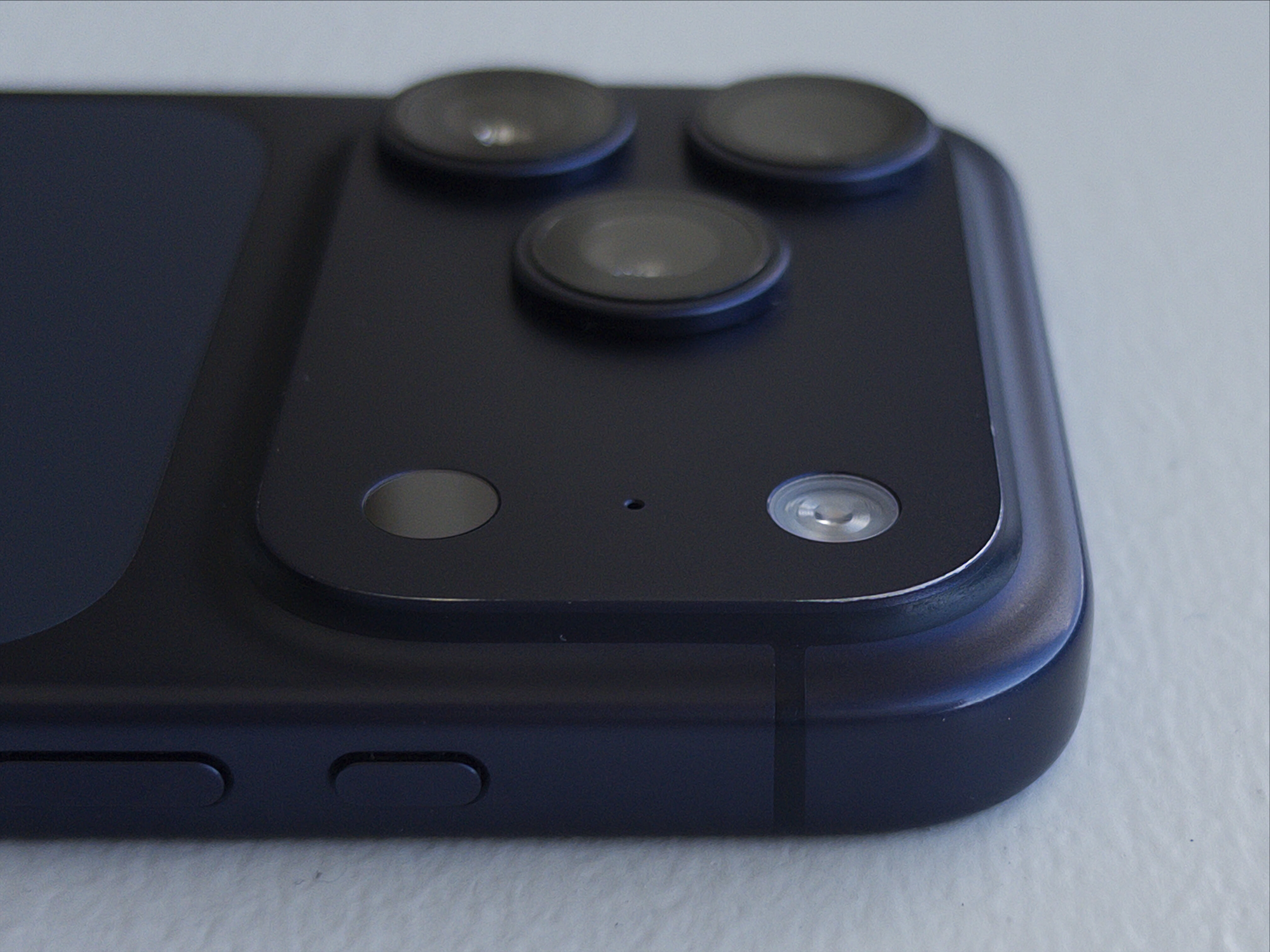
My personal rule has been to always buy black, or the nearest to black offered. Deep blue isn’t all that near to black, but it was the nearest, so that’s what I bought. I wouldn’t call it fun but I liked it when I bought it and I’m not tired of it now, nearly a year later. It’s a serious blue. After 10+ months of near-daily use, the anodization is beginning to wear away at the top corner of my iPhone’s camera plateau, where there’s a bit of a sharp corner. I find this to be a charming patina, not a flaw, and looking at that wear increases my affection for this little guy.

My deep blue iPhone 17 Pro, showing the worn anodization at the corner of the camera plateau.

(Photo taken with the iPhone Air, using Halide Mark III.)

I’ve shot (and kept) 5,365 photos and 97 videos with the iPhone 17 Pro. (Perhaps I should shoot more videos.) The iPhone camera has long been the best camera in the sense of “The best camera is the one you have with you.” With each successive year, they come closer and closer to being the best camera I’ve ever owned, period. It’s really quite remarkable how good a camera it is.

Battery life has been excellent. I charge to 100 percent every night while I sleep, and never worry about it during the day. Very seldom is the battery under 25 percent by the end of the day. According to the statistics in Settings → Battery → Battery Health, maximum battery capacity remains at 96 percent after 230 cycles. That seems pretty good.

Durability has been terrific as well. I mentioned a month ago that Apple’s “Ceramic Shield 2” process seems to be the real deal. Even under close inspection, there’s seemingly not a single micro abrasion on the front glass. I used a Nomad leather back during the very coldest weeks of the East Coast winter, but otherwise have never used a case. Despite near-daily use for 10-ish months, it’s in near-mint condition. I’ve also found that the phone, naked, is about as grippy as one could hope in most weather conditions, the frigid cold being the one exception.

Dust and fuzz accumulates in the USB-C port — just like every phone with a USB port. I clean it out every few months. Some sort of crud also accumulates in the very thin, easily overlooked slit for the speaker at the top of the display. That requires something like a pin or needle to clean. I don’t know what that crud is and I don’t want to know. I also don’t know what Apple could do about this crud accumulation, but I need to reach deep to find anything at all to complain about regarding this iPhone. I look forward to a future hermetically sealed iPhone which has no crevices in which to accumulate crud.

One year later and it feels like both the iPhone 17 Pro and iPhone Air could be announced tomorrow, not a year ago, and would seem fresh and exciting.


  1. Apple also created a battery pack exclusively for the Air: the $100 iPhone Air MagSafe Battery. Like Apple’s late great Lightning MagSafe Battery Pack, the Air MagSafe Battery is a much better product than any third-party battery pack I’ve ever tried, and I’ve tried an embarrassing number of them. It sticks better magnetically, and there’s software integration with iOS that shows the battery pack’s remaining power when you first connect it, and in the Battery widget. iOS also seems smarter about when to draw power from it, making it last longer. It’s a no-brainer recommendation for anyone who buys an iPhone Air. You won’t need it most days, but on the days when you need it, it’s perfect.

    My only gripe about the iPhone Air MagSafe Battery remains the same from the day it was announced last year: it has “Air” in the name because it’s designed exclusively for the iPhone Air. Apple’s old Lightning MagSafe Battery Pack was designed to fit any iPhone. (In fact, it debuted in 2020 alongside the iPhone 12 Mini, an iPhone that actually needed help getting through the day on a single charge.) The old Lightning battery pack remains so good that I continue to use mine (I own two) instead of the numerous third-party ones I’ve blown money on in the intervening years. The old Lightning ones don’t pack much of a punch, juice-wise — particularly because they’re now several years old — but no matter how much I use my iPhone, it’s always enough to extend me through the day. (The key is not to start using it until your iPhone drops under 30 percent — it takes less energy to recharge a mostly depleted battery.) I continue using them because they stick to the back of the iPhone so strongly, and, once attached, are so comfortable. It’s the last Lightning device I actively use, but unless Apple comes out with a proper USB-C replacement that works on iPhones other than the Air, I don’t foresee retiring mine until they’re completely shot. ↩︎

  2. The front-facing camera on the iPhone Air is the new (for 2025) Center Stage camera. It’s exactly the same front-facing camera as the iPhone 17 Pro and non-pro models, and uses a square sensor with a wider field of view. ↩︎︎

  3. This, of course, makes me wonder about the one-handed usability of the passport-sized foldable iPhone that Apple is expected to unveil tomorrow. ↩︎︎

★ SuperDuper 4

8 September 2026 at 16:55

I have mentioned and recommended Shirt Pocket’s Mac backup app SuperDuper quite a few times over the years, and for good reason: it performs very important functions very well. Version 4, which shipped just over a month ago, is an extraordinary update to an extraordinary app.

Visually, the interface is all new. That took some getting used to, but not much. It didn’t take long for me to see how the new UI is better in every way. The style of presentation is new and modern, but the core idea remains the same: the interface of SuperDuper is self-explanatory. It explains what, exactly, is going to happen. It remains a marvel of clarity, especially when you consider the complexity of what it does.

Functionally, SuperDuper 4 is also much improved. SuperDuper has never been slow, but now some copy operations are over 2× faster. Scheduling options are more powerful. You don’t need to worry about the details to use SuperDuper, but the details are there for your inspection.

Shirt Pocket’s Dave Nanian designed it, implemented it, and thoroughly documented it. I don’t know how that’s possible. SuperDuper feels like impossibly good software. Read his post announcing version 4 to start, then catch up on the rest of the blog to get a feeling for how much work he’s put into SuperDuper 4. Just extraordinary.

In the 22 years since SuperDuper first shipped, Shirt Pocket has never charged for updates and never raised the price. (This too seems impossible, at least for a company that remains in business.) Version 4 costs $44 — an astonishing value — and discounts are available for anyone who bought version 3 after July 2020. Sans license, free of charge, SuperDuper 4 still allows you to make bootable backups.

I recommend SuperDuper 4 wholeheartedly.

See also: Dan Moren at Six Colors and Michael Tsai.

[Sponsor] Glyphs 4

Glyphs 4 is here: a Mac-native app for creating fonts, lettering, icons, and pictograms. Draw with flexible strokes and efficiently reuse shapes across huge glyph sets, explore variable vector designs with complex higher-order interpolation. Build and manage massive font families and icon sets with ease, export all modern font formats, SVG, PNG and PDF. Hundreds of refinements and native Tahoe support make designing, testing and shipping your vectors smoother than ever. Glyphs 4: Create. Love the process.

Discover Glyphs 4, and use code FIREBALL to save $30 if you purchase in the next month.

Trackables 1.5

8 September 2026 at 00:01

Trackables:

There are plenty of health tracking apps. Surprisingly, nearly all of them are bloated, subscription-gated, or blatantly harvesting our data; often all three. We wanted something simpler, less annoying and more fun, that’s where it started.

Trackables turns the data your Apple Watch already collects — activity, sleep, steps, heart rate — into a clear, friendly, transparent interface.

Totally free of charge, totally private, made by a small team of ex-Apple folks. (They might add a paid tier in the future, but core functionality will remain free.) I’ve been using Trackables for months and it’s just a better dashboard to the stats I care about than the Health app itself.

(One interesting detail: HealthKit only makes raw data available to apps. Apple Health’s “sleep score” isn’t part of that data — only the raw input, like how many hours you slept, and how much time was spent in each sleep stage. So Trackables computes its own sleep score. When I bother to compare, Trackable’s score is almost always similar to Apple’s, but seldom exactly the same. But I personally find that Trackable’s sleep score corresponds better to how I feel I slept. Which, admittedly, is usually pretty good.)

McKinley 1.0

7 September 2026 at 22:00

Crackerjack new Mac app for creating and editing custom SF Symbols, from developer Amy Worrall:

McKinley is an all-in-one studio for drawing and annotating SF Symbols. It bundles vector tools with knowledge of the SF Symbols structure, so you can edit one set of objects across multiple weights, sizes and colours. Import SVG or start from scratch, live preview your work using Apple’s own renderer, and export directly to Xcode, so you never need touch the SF Symbols app again!

McKinley is Mac-assed out the wazoo:

  • Rich AppleScript support, including a library of practically useful example scripts.
  • Quick Look previews and thumbnails for documents.
  • A well-written comprehensive user manual. (Me, a few months ago: “There exist good products with bad or no documentation, but there are very few poor products with great documentation.”)

I mean just look at McKinley. It’s both beautiful and quite obviously a serious professional tool. McKinley is a $60 one-time purchase, and there’s a 15 percent launch discount this week only (taking the price to just $51). What a remarkable 1.0.

See also: Michael Tsai; Worrall on Mastodon.

❌