Normal view

Received — 7 July 2026 Daring Fireball

OS 27 Developer Beta 3 Enables New ‘Pace’ and ‘Expressivity’ Sliders for Siri’s New Voices

7 July 2026 at 17:22

Sarah Perez, writing for TechCrunch:

With the latest iOS 27 developer beta, Apple is giving testers an early look at one of the upcoming improvements to its AI-powered Siri: the ability to adjust how quickly and expressively the AI assistant speaks. In iOS 27 beta 3, out today, Apple has enabled the voice controls for “Pace” and “Expressivity” that were previously labeled as “Coming soon” in the first developer beta releases.

I started running developer beta 1 on a spare iPhone the day it came at WWDC. It proved so stable, and Siri AI so useful, that I moved my primary iPhone 17 Pro to the iOS 27 betas with beta 2. So I’ve more or less been living on iOS 27 developer betas for a month now. If you’re as reckless as me, you’re probably doing so already too. If you’re not, you should probably at least wait for the public betas, the first of which I’ll bet is imminent. The stability of these betas right out of the gate is proof that this really is a Snow Leopard-type fix-and-improve-the-foundations year. I love it.

As for the new Siri voices, I think both of the new voices that are available so far are very good. Voice 1 is female and voice 2 is male; I’ve spent days with both but prefer the female voice. (I’d pay a fortune for a male voice that sounded like HAL 9000; I don’t like this guy who sounds, I don’t know, like a child psychologist or something. I don’t want “friendly”, which to me sounds saccharine and phony from a computer. The female voice sounds more emotionally removed, and thus honest, to me.)

Credit to Apple here. Now that these sliders are available, I have to say they nailed the defaults. After a month using them without the sliders, I thought that once the settings became available I might want to tone expressivity down one notch and/or turn the pace up one notch. But, no. A little less expressivity doesn’t make voice 1 sound less phony to me — it makes her sound a tad stoned. And even one click more pace sounds too fast for me — hurried, not curt. Nailing defaults is hard and I think Apple nailed these.

(The system dictionary definition of curt: “rudely brief”. That’s what I want from an AI voice. That’s a computer being honest about what it is.)

★ Apple Should Eliminate the App Icon ‘Squircle Jail’

7 July 2026 at 00:23

Paul Kafasis, in a post at Rogue Amoeba’s blog titled “Free the Icons”:

Apple’s prohibition on shapes is a step backward for both usability and creativity in app icons. Icons are now harder to distinguish because they’re no longer allowed to be distinctive. But there’s no technical reason for it. Apple could, and should, once again allow icons to take on a wide variety of shapes.

It’s clear that some people within Apple recognize that the transition to Liquid Glass introduced mistakes. They also appear to have the authority to fix those mistakes. Refinements to Apple’s own icons in Golden Gate are a welcome course correction, as is the much-celebrated Liquid Glass opacity slider. It’s time to correct the mistake of banning icon shapes as well.

Apple should stop forcing every icon into the same squircle.

The squircles, I will point out, are not in and of themselves the problem. The problem would be the same with any mandated shape, like, e.g., VisionOS’s circles.

John Siracusa:

Squircle Jail is the worst design-related thing Apple has ever done to Mac developers, and probably the worst icon-related thing it has ever done, period. Incredibly developer-hostile.

If squircled icons are actually better, then let that design win in the market. That’s how we transitioned from the classic Mac OS icon style to the more photorealistic Mac OS X icon style. Developers adopted it because they wanted to, and because users desired it.

John Siracusa has a long memory, cares deeply about Mac design, and is not prone to hyperbole (putting it mildly). I’m not sure I agree with him that this is “the worst design-related thing Apple has ever done to Mac developers”, but it’s certainly on the short list for consideration. And, like Siracusa, I can’t think of any other design crime Apple has ever foisted on Mac developers that I’d argue (with Siracusa) was worse.

It’s one thing for Apple to force all of its own app icons into the same identical shape. That would be bad enough, because Apple’s own Mac apps are numerous and popular, and as the platform owner Apple necessarily sets the direction that many third-party apps follow. But it’s just downright spiteful to enforce it platform-wide. Apple decided they’re no longer going to create nice icons with unique, interesting, and most importantly, distinctive shapes — but they no longer allow third-party apps to either. It’s like Apple decided every single one of its own apps must wear a stupid-looking hat, and they put those stupid-looking hats on third-party apps too, whether the developers of those apps want them or not. Scratch that. Not hats but helmets. The mandatory squircle makes identifying apps at a glance harder in the same way that it’s difficult to identify individual people if they’re all wearing same-shaped helmets. Real helmets at least serve an important safety purpose. The squircles are like stupid unnecessary helmets.

To that point, Jim Nielsen draws an even better analogy — traffic signs:

Consistency for traffic signs! Let’s start by redesigning them all to be the same shape.

Four diamond-shaped road signs: a yellow right-turn warning sign, a red stop sign, a white speed limit 80 sign, and an Interstate 15 highway marker.

Which was a sarcasm-dripping reply to his own previous post:

Shape isn’t everything, but it’s one tool to help provide differentiation and uniqueness in icons. But not anymore.

Four Apple app icons in black on a light gray background: the Keynote lectern logo and its squircle app icon, and the Numbers bar chart logo and its squircle app icon.

Just the mere silhouette of the old Keynote icon is more recognizable, and thus more iconic, than any icon on any platform from Apple today.

No civil engineer would ever suggest changing yield and stop signs from their iconic triangles and octagons to identical squircles. The human visual system evolved to be remarkably good and quick at identifying shapes. The primary element of an app icon is the semantic meaning of its illustration. Color and shape are secondary. With the squircle mandate, Apple has removed shape from the equation.1 The purpose of icons is right there in their name: to be iconic. Shape was often the most iconic thing about an icon. Now it’s no part at all.

It makes no more sense than removing color. But Apple did that too! One of the purported reasons for the new icon guidelines across MacOS and iOS are the tinted and clear appearance options introduced last year with Liquid Glass and the OS 26 releases. These are both terrible ideas that remove color as a distinguishing factor, reducing ostensibly distinguishable icons into indistinguishable buttons. Adam Engst skewered the Clear and Tinted icon appearance options in a recent column at TidBITS, and ran a poll to see if anyone actually used them. Spoiler: nope.

App icons used to be exuberantly fun and so beautiful that they were the subject of two splendid coffee table books. This squircle shit is no fun at all, and ugly as sin.

Let’s go back.


  1. With the new Creator Studio suite, Apple has largely (and for some apps, entirely) removed semantically meaningful illustrations from its own app icons. The only thing left to distinguish them is the color of the crude squiggle inside the squircle. ↩︎

Markdown Now Has a Uniform Type Identifer (UTI) in Apple’s Version 27 OSes

6 July 2026 at 22:38

The third developer betas of Apple’s 27 OSes dropped today, and this new page in Apple’s developer documentation drew my attention — a built-in Uniform Type Identifier for Markdown data:

The identifier for this type is net.daringfireball.markdown.

This type conforms to [utf8PlainText].

My main link here is to the Swift documentation, but it’s available in good old Objective-C too.

I had previously recommended conforming to public.plain-text but stated that the text encoding should be UTF-8. I’ve updated my own recommendation to public.utf8-plain-text to enshrine the UTF-8 encoding. (Back in 2004 UTF-8 support was far from universal. Today it is.)

Received — 6 July 2026 Daring Fireball

Backblaze Versus Dropbox

6 July 2026 at 20:34

There’s a been a lot of (justified) concern and consternation over the last year regarding Backblaze — an online backup service whose simple pitch is that it backs up your entire computer, including the startup drive and external drives — and online file storage services like iCloud Drive, Dropbox, Google Drive, and Microsoft OneDrive. Backblaze stopped including the contents of such services in its backups. Michael Tsai (as usual) collected a long list of links regarding this.

The whole thing is complicated and confusing. The basic gist, I think, is that Backblaze has stopped trying to back up the contents from these services because sometimes the files aren’t really there on your local file system, but they sorta kinda look like they’re there. That’s what I meant in my post earlier today about Maestral regarding Apple’s modern File Provider APIs. You know how sometimes in iCloud Drive — or Dropbox or OneDrive or anything else that might use these APIs — you can see a file or folder in the Finder, but there’s a “cloud” icon next to it, and you have to click the cloud icon to actually download it? That.

With Maestral none of that comes into play. Maestral just keeps a folder on your local computer in sync with the contents of your Dropbox account. Just like the original Dropbox first-party app back in the day. So if you use Maestral, Backblaze does back up your Dropbox folder, because your Dropbox folder is just a regular folder (albeit, probably, a big one). It’s not a magic folder. Just a regular folder. And the Maestral software keeps its contents in sync. With software that uses Apple’s File Provider APIs — which effectively includes iCloud Drive — what you see as a user are magic folders, and the magic is undocumented.

Now, it turns out that Dropbox’s own first-party Mac client still has an available mode that doesn’t use the File Provider APIs. Some people who use that old-school mode report that Backblaze still backs up their Dropbox folder. Some people say it doesn’t. Like I said, it’s confusing and complicated and undocumented on all sides. I would rather not worry about it. And with Maestral, I haven’t had to worry about it. When Maestral stops working, I might have to start worrying about it.

The first item Tsai links to is this post from Rob Halliday to the venerable TidBITS-Talk forum.

Allen Pike, Back in November: ‘Why Is ChatGPT for Mac So Good?’

6 July 2026 at 19:37

Allen Pike, back in November (and corresponding Hacker News thread):

Still, I wouldn’t count out the possibility of a change in course here. While mobile is king, desktop is still where work happens. While OpenAI has acquired Sky to double down on desktop, Google has long been all-in on the browser. That leaves Anthropic as the challenger on desktop, with their latest models begging to be paired with well-crafted apps.

A few months ago Google launched a native Gemini app for the Mac. A month ago I wrote about why it’s not that great, and annoyingly presumptuous. Almost all good Mac apps are native; not all native Mac apps are good.

What keeps me using ChatGPT and keeps me away from using Claude is not that ChatGPT happens to be written using native APIs like AppKit. It’s that it looks and feels like a Mac app — you know, with a Settings window that is ... a window. And even more so, with very cool features like its ability to attach a chat to an open document in BBEdit or Notes. When ChatGPT is attached to an open document in another app, it’s not a snapshot at the moment of attachment, like what you’d get by copying and pasting the whole thing into the chat, or by dragging the current version of the file into the chat. It’s a live ongoing attachment, so as the attached document/note changes, ChatGPT sees the changes. It’s such a great feature, and I don’t think it exists on any platform but the Mac. And it couldn’t exist on iOS, which, because of its kindergarten-safety-scissors design, doesn’t allow for inter-application communication.

I worry for ChatGPT’s future, though.

While Anthropic could surprise everybody by dropping a native Mac app, I would bet against that. There’s a lot of headroom available to them just by investing in doing Electron well, mixing in bits of native code where needed, and hill-climbing from “website in shell” to “great app that happens to use web technology”.

Just as ChatGPT’s unexpected success woke OpenAI to the opportunities of being more product-centric, the breakout hit of Claude Code might warm Anthropic to the importance of investing in delightful tools. Last year they brought on Mike Krieger as CPO, who certainly seems like he could rally a team in this direction given the chance.

I don’t know what Krieger is doing there, but it sure doesn’t seem like he’s focused on creating delightful tools.

See Also: In December 2024 Allen Pike was my guest on The Talk Show, for an episode largely focused on AI.

Update: I was correct — Krieger is still at Anthropic but at the start of this year he left his role as chief product officer to head up their “Labs” team, where they’re building new product experiments. Krieger spoke about the role shift briefly during an interview last week at the “AI Engineer World’s Fair” conference.

Maestral, the Open Source Splendidly Simple Mac Dropbox Client, Has Been Retired

6 July 2026 at 19:04

Maestral developer Sam Schott, on the Maestral website:

As of June 2026, Maestral is no longer actively maintained. The current version will continue to work until certificates expire.

Schott, on Maestral’s GitHub project page:

As of 2026-07-28, this project is archived. It’s been a fun challenge to develop a syncing client, but unfortunately, I find too little time to invest in Maestral these days. I’ve also moved away from using Dropbox myself.

Maestral will still remain usable in the medium term, but will no longer be actively maintained or receive updates.

You get what you pay for, and Maestral is free of charge and open source. But man, this is a real bummer. I absolutely love Maestral. It restores Dropbox to its original vision — a folder on my Mac that syncs. Nothing at all like the bloated app that Dropbox’s first-party Mac client has grown into. And it doesn’t use any of MacOS’s modern File Provider APIs, which in my experience provide me with no benefits that I want, and saddle me with much needless complexity that I don’t. With Maestral, it’s just a quiet app that runs in the background, consumes preciously few CPU and memory resources, and just syncs a folder of your choosing to your Dropbox account. I of course chose ~/Dropbox/. It’s always been super robust for me. It’s not a hack — it syncs to Dropbox using Dropbox’s APIs.

As of today Maestral continues to work just fine. I don’t know when these certificates are expiring. And I don’t know what I’m going to do when they do. I might try moving everything from my Dropbox account to iCloud Drive. That certainly seems worth trying before I resort to going back to Dropbox’s own monstrosity of a Mac client.

In theory, because Maestral is open source, someone could fork it and keep it going. But my impression has always been that it was a one-man show from Schott, and if he’s personally no longer using Dropbox, it’s easy to see why he’s lost interest in maintaining Maestral.

So it goes.

Jason Snell Ends His Column, and 28-Year Run, at Macworld

6 July 2026 at 16:35

Jason Snell, at Macworld:

My first day on the job at Macworld, Apple was perilously close to going out of business. It was the fall of 1997, and Steve Jobs had returned to Apple and engineered the ejection of Gil Amelio as CEO, but there was no iMac yet, no visible turnaround in terms of products at all. Beyond the release of the iconic “Think Different” ad campaign, there was nothing.

Apple’s survival hung by a thread. Steve Jobs asked everyone to trust him. At Macworld Expo, he had enlisted Bill Gates–Bill Gates, of all people!–to help him instill belief in the world that Apple would find a way to survive.

The world was skeptical, to say the least. My family asked what job I thought I’d get once Apple went out of business. The magazine I had worked at for four years, MacUser, had folded, and some of us had been transferred over to our rival, Macworld, presumably to publish issues until Apple finally gave up the ghost and died. We existed to minimize the loss exposure of our respective publishing companies.

1997 was weird, folks. And that’s how my tenure at Macworld started.

Received — 4 July 2026 Daring Fireball

Day One Journal

4 July 2026 at 23:02

My thanks to Day One Journal for once again sponsoring Daring Fireball. Day One first launched in 2011 and has been the stalwart of journaling apps on Mac and iOS ever since. Day One’s apps exhibit a commitment to technical and design excellence, and, more importantly, everything they do is deeply informed by the intense personal nature of keeping a journal. (Or journals — Day One lets you create as many separate journals as you want.) The Day One Mac app is Mac-assed and the iPhone and iPad apps are, well, iOS-assed. Fast, familiar, consistent, and intuitive.

Day One recognizes that many people struggle with journalling not because they can’t write, but because they don’t know how to begin or what a “good” journal entry about their day looks like. That’s why they built Daily Chat, a guided reflection experience that helps you talk through your day, organize your thoughts, and shape them into a journal entry.

Early testers commented: “Day One’s new Daily Chat is a true game changer for my daily journaling. The AI-powered chat makes capturing thoughts effortless and inspires creativity like never before. Writing my diary has never been this intuitive and fun!

Try it for yourself, it will change the way you think about journaling.

From the DF Archive: ‘Electron and the Decline of Native Apps’

4 July 2026 at 21:28

Yours truly, back in 2018:

I don’t share the depth of their pessimism regarding native apps, but Electron is without question a scourge. I think the Mac will prove more resilient than Windows, because the Mac is the platform that attracts people who care. But I worry.

In some ways, the worst thing that ever happened to the Mac is that it got so much more popular a decade ago. In theory, that should have been nothing but good news for the platform — more users means more attention from developers. The more Mac users there are, the more Mac apps we should see. The problem is, the users who really care about good native apps — users who know HIG violations when they see them, who care about performance, who care about Mac apps being right — were mostly already on the Mac. A lot of newer Mac users either don’t know or don’t care about what makes for a good Mac app.

This eight-year-old piece holds up well. My concern was justified, but so too was my lack of defeatist pessimism. Truly native, idiomatically correct Mac-assed Mac apps are resurgent. Electron and its brethren non-native frameworks have not receded, but they haven’t gained further ground. For every Claude (Electron) there’s a ChatGPT (AppKit). I’m seeing more new good Mac apps released today than I was in 2018, and longstanding Mac stalwarts continue to thrive. High tide seems to have passed without washing the native platform away.

Apple itself is a good example. The Mac version of Journal, first introduced in MacOS 26 Tahoe, is a profound disappointment — not just because of serious bugs but because it’s un-Mac-like in sad ways. You can’t open an entry into its own window, for example. But the brand-new Siri app in the developer betas of MacOS 27 Golden Gate is pretty Mac-like. You can double-click chats in list view to open them in their own windows, for example. (You can’t double-click chats in grid view to open them into windows, though — presumably a bug.) Siri is not a great Mac app but it does feel like a Mac app, and it’s only a 1.0 in its second developer beta. It doesn’t feel like an iOS app running in a Mac window, like Journal does.

The ironic frustration with Anthropic’s Claude app being an Electron turd is that Claude and especially Claude Code are so capable of helping to create good native Mac apps. It’s one thing for a big company or organization with cross-platform aspirations but no institutional Mac expertise, like Notion or Slack or Discord, to choose Electron to create their Mac client. It’s another when it’s a company like Anthropic, whose only product’s single most impressive ability is generating programming code, including high-quality AppKit and SwiftUI code for the Mac. To return to my hammering-screws-into-the-walls metaphor from yesterday, it’s as though the building into which Anthropic decided to hammer all the screws is a renowned screwdriver factory.

Fantastical 4.1.15 Adds Calendar Mirroring

4 July 2026 at 18:57

Flexibits:

Calendar Mirroring allows you to connect two separate calendars (like work and personal) so that events from one automatically show up on the other.

The best part? No event information is sent to Flexibits servers or saved outside of your device.

You can choose to show full event details or just block the time out as a mysterious, professional “Busy”. Your coworkers don’t need to know you’re getting a root canal, they just need to know you’re unavailable.

In Flexibits’s example scenario, the idea is that you have a personal calendar with important events that you want to mirror to your work calendar, to block the times for those events off — and you might just want them marked as “Busy” on your work calendar, rather than revealing the actual details.

I’ve been using this feature in beta for a few months and love it, even though my use case is seemingly simple. For recording episodes of Dithering, Ben Thompson and I have a shared Microsoft 365 calendar. (You can guess which of the two of us set that up by that fact.) Fantastical has long had terrific built-in support for Microsoft 365 accounts. So for me, those events have always just shown up in Fantastical. For me.

The problem is, my wife and I share an iCloud calendar, where we put events we want each other to know about. My Dithering recordings have never shown up there. Ben and I record on a pretty regular schedule, but it’s always been a minor irritation that my wife can’t see when I’m booked for Dithering. Fantastical’s new mirroring feature solves this perfectly. I set up a mirror to copy all events from my Dithering calendar to my family calendar, keeping the original event titles rather than obscuring them as “Busy”. (The titles all just say “Dithering”.)

The icing on the cake is Fantastical’s longstanding “Combine identical events” preference setting. Because I have that setting on, I don’t see duplicate “Dithering” events — one from my Dithering calendar, and another from my family calendar. I just see one event for each scheduled recording, with a striped dual-color swatch that indicates that this one event exists on both calendars. It’s just perfect.

One more thing: Also somewhat recently, Fantastical added support for Anthropic’s MCP to integrate your calendaring with Claude Desktop and every other AI agent that supports the standard. David Sparks made a short demo video that shows it off. I don’t really use Claude so this didn’t hit for me personally, but it seems cool enough that it made me at least consider, for a moment, switching from ChatGPT to Claude. Then I remembered what the Claude app is like.

★ Claude’s Criminally Bad Electron Mac App Is an Inside Job

3 July 2026 at 23:24

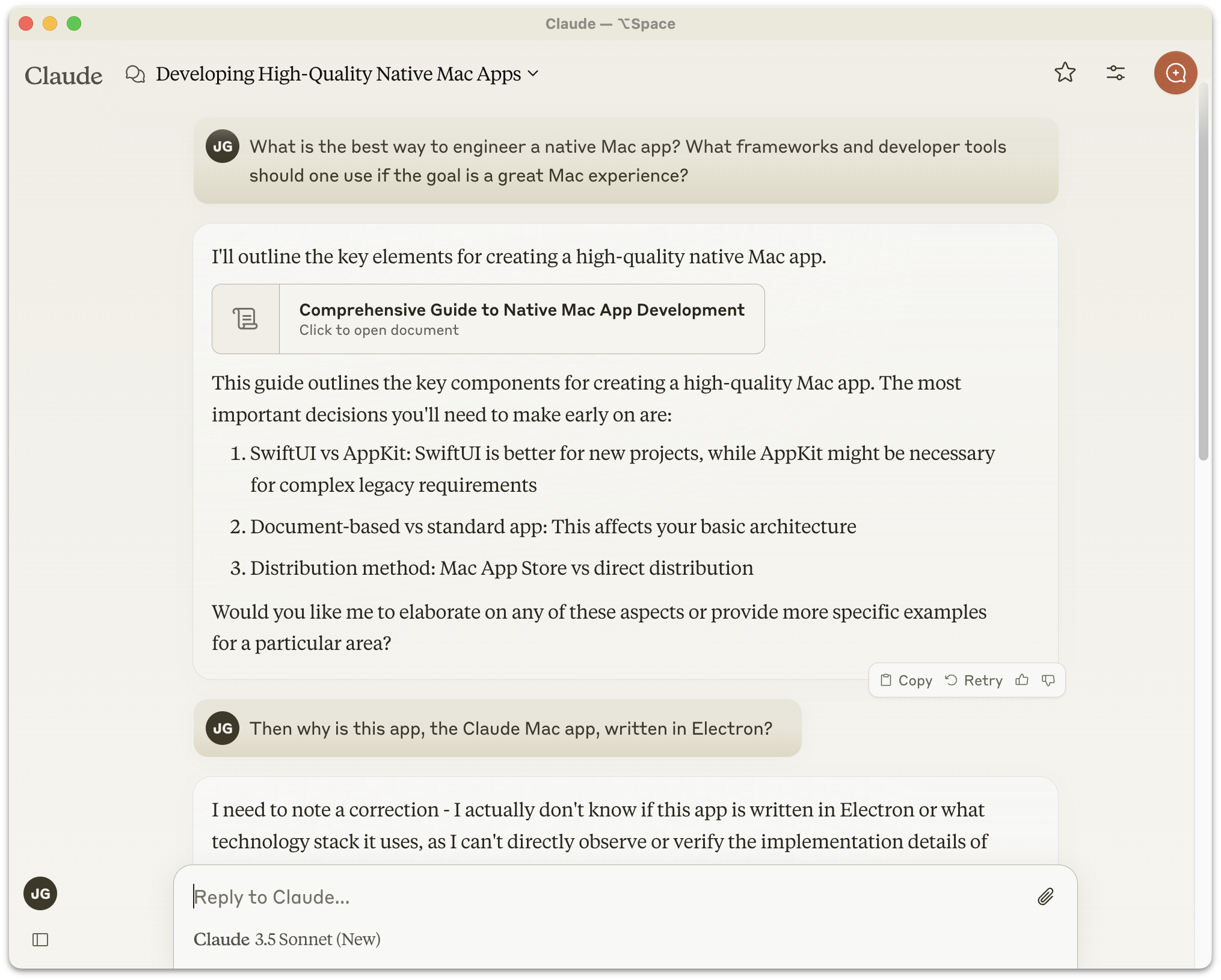
Anthropic released the first version of the Claude “desktop” app for MacOS in October 2024 — an Electron clunker that did not impress UI designers. When it came out, I wrote:

ChatGPT’s native Mac app, on the other hand, is a truly native Mac app. It looks like a Mac app and feels like a Mac app because it really is a Mac app. I’ve liked it ever since it launched back in May, and it keeps getting better. And I keep using it more and more as my go-to resource for answering questions.

I asked Claude, “What is the best way to engineer a native Mac app? What frameworks and developer tools should one use if the goal is a great Mac experience?” Claude’s answer started by positing it as a decision between SwiftUI and AppKit. Perhaps Anthropic’s Mac engineers should have asked Claude this same question before they built this turd of an Electron app.

In March of this year, linking to Anthropic’s announcement that Claude Code and Claude Cowork can take control of your Mac to accomplish agentic tasks, I returned to the same question:

The Claude Mac client itself remains a lazy Electron clunker. If Claude Code is so good I don’t get why they don’t prove it by using it to make an even halfway decent native Mac app.

I’m not the only one who has pondered this. Drew Breunig wrote “Why is Claude an Electron App?” in February this year:

On the surface, this ability should render Electron’s benefits obsolete! Rather than write one web app and ship it to each platform, we should write one spec and test suite and use coding agents to ship native code to each platform. If this ability is real and adopted, users get snappy, performant, native apps from small, focused teams serving a broad market.

But we’re still leaning on Electron. Even Anthropic, one of the leaders in AI coding tools, who keeps publishing flashy agentic coding achievements, still uses Electron in the Claude desktop app. And it’s a slow, buggy, and bloated app.

So why are we still using Electron and not embracing the agent-powered, spec driven development future?

For one thing, coding agents are really good at the first 90% of dev. But that last bit — nailing down all the edge cases and continuing support once it meets the real world — remains hard, tedious, and requires plenty of agent hand-holding. [...]

For now, Electron still makes sense. Coding agents are amazing. But the last mile of dev and the support surface area remains a real concern.

I’m with Breunig up until the point where he accepts coding agents struggling with the final 10 percent as a justification for choosing Electron to create a Mac app. Plenty of people — individuals and teams alike — are using Claude Code to create terrific new native Mac apps. Just among my friends, Glenn Fleishman, Lex Friedman, and Jason Snellman, have all in recent months used not just AI coding assistants in general, but Claude Code specifically, to create genuinely native Mac apps that meet their own personal high standards for Mac-assedness, forged through decades of literally professional Mac snobbery. A comprehensive catalog of Mac-assed apps made with the assistance of Claude Code, would, I suspect, be remarkably long.

The struggle with the last 10 percent is unrelated to AI coding. It’s the nature of all software engineering. There’s a well-known adage that Wikipedia names the “Ninety-Ninety Rule”, attributed to Tom Cargill of Bell Labs:

The first 90 percent of the code accounts for the first 90 percent of the development time. The remaining 10 percent of the code accounts for the other 90 percent of the development time.

Cargill’s mathematically humorous formulation resonates because it not only explains why the final 10 percent consumes half the time, but also why software projects tend to take twice as long as expected. This universal truth holds whether the code is human-written, AI-generated, or a mix of both.

Breunig gets closer to the truth in a postscript, linking to the Hacker News thread discussing his post. The top-rated comment in the HN thread is from Boris Cherny, who works at Anthropic on the Claude Code team. Cherny wrote:

Boris from the Claude Code team here.

Some of the engineers working on the app worked on Electron back in the day, so preferred building non-natively. It’s also a nice way to share code so we’re guaranteed that features across web and desktop have the same look and feel. Finally, Claude is great at it.

That said, engineering is all about tradeoffs and this may change in the future!

I would rephrase the guarantee that “features across web and desktop have the same look and feel” as guaranteeing that the Mac app is restrained by the limits of the web and cut off from the breadth of idiomatically native functionality provided by the Mac’s native frameworks. Electron guarantees that an app feels just as wrong on all platforms. But the more relevant tidbit is this sentence: “Some of the engineers working on the app worked on Electron back in the day, so preferred building non-natively.” So it’s not that Claude somehow prefers Electron, but that “some of the engineers” at Anthropic do.

Some is doing some heavy lifting there, given that “some of the engineers” includes Felix Rieseberg, currently Anthropic’s engineering lead for Claude Cowork and Claude Code Desktop, and previously engineering lead for the Claude apps for MacOS and Windows. Rieseberg didn’t merely “work on Electron back in the day”. He is one of the principal people responsible for creating Electron, and remains today one of three members of the Electron project’s Administrative Working Group that “oversees the entire governance and project”. He literally wrote the book on Electron.

Felix Rieseberg, quite obviously, is the answer to the question why Claude is an Electron app. It’s like wondering why all the screws in a building were hammered into the walls, and then finding out that the guy who oversaw construction founded and co-owns the world’s biggest hammer manufacturer. Windows uses Philips head screws, Linux uses hex screws, and MacOS requires Torx (of course) — but a hammer works the same way with all screws. That’s Electron. That’s Rieseberg’s baby.

Rieseberg, it turns out, hasn’t only had a hand in Claude being an Electron app. Per both his personal home page and LinkedIn profile, before joining Anthropic he spent over two years as the engineering manager for the desktop team at Notion, whose client for Mac is a massive 518 MB Electron app and a notoriously non-native experience.1 Before Notion, Rieseberg spent 2016–2021 “as a Senior Staff Engineer and Engineering Manager at Slack, where I got to support a team of amazing C++ engineers building the cross-platform desktop framework Electron — as well as Slack’s desktop apps for macOS, Windows, and Linux.”2

Finding out that one guy — who is a senior Electron maintainer — has led the teams for the desktop clients for Slack, Notion, and now Claude is like discovering that it was one guy — whose family business was a distillery — who helmed the Titanic, piloted the Hindenburg, and then served as air traffic controller for Amelia Earhart.


  1. Notion, it’s worth pointing out, has perhaps seen the error of their ways. Apple prominently featured Notion during the Platforms State of the Union technical keynote at WWDC last month, saying, “And apps that previously used cross-platform or web technologies like Notion are migrating their user interface to SwiftUI because they want a level of performance and UI consistency that other technologies can’t deliver.” This, just one year after Rieseberg left for Anthropic. Perhaps Claude will similarly seek to wash the Electron stink off the Claude app eventually. I suspect an Electron codebase is like sap, though — sticky, dirty, and harder to wash off the longer you wait. ↩︎

  2. Before getting promoted to engineering manager in charge of all of Slack’s “desktop” apps, Rieseberg started at Slack as engineering team lead for Windows, which offers an inkling as to his platform taste. ↩︎︎

Received — 2 July 2026 Daring Fireball

★ A Tale of Two Modems

2 July 2026 at 01:26

Marko Zivkovic, reporting for AppleInsider regarding some of the data revealed by Tata Electronics’s massive data breach:

For the U.S. variant of the iPhone 18 Pro, which will feature mmWave compatibility, Apple seemingly plans to use Qualcomm modem hardware. Multiple Qualcomm components, including the SDX80M, SDR875, QDM8771, QDM8720, PMK75, PMX75, and QET7100A, are referenced in a bill of materials related to the iPhone 18 Pro model Apple plans to sell in the United States.

As for the iPhone 18 models which will be sold elsewhere, Tata documentation suggests these configurations will use Apple’s proprietary C2 modem. While this approach may sound unusual, there is at least one possible explanation.

Apple’s current in-house modems, the C1 and the C1X, do not support 5G mmWave, and it looks as though the C2 will continue this trend. Until Apple develops a modem compatible with mmWave, it looks as though the company will offer mmWave support to iPhone 18 Pro users by using Qualcomm hardware.

This immediately raises the question of which modem is “better”, and I suspect the answer requires nuance. Apple’s C1 and C1X modems are, by all accounts, noticeably more power efficient than Qualcomm’s. An iPhone with an Apple C-series modem should get longer battery life than an otherwise identical iPhone with a Qualcomm modem. The obvious advantage to the Qualcomm modems is support for 5G mmWave, the super high-speed 5G bands primarily offered by Verizon.

Personally, I don’t care about mmWave speeds. It literally makes no difference in my experience compared to regular 5G speeds. In fact, ever since WWDC a few weeks ago, I’ve had my iPhone 17 Pro set to use LTE instead of 5G. (Settings: Cellular: Cellular Data Options: Voice & Data.) I literally notice no difference in speed and I presume that battery life is improved. Battery life certainly isn’t worse. (I switched to LTE after a friend at WWDC suggested that LTE has better range/penetration in places like airports, especially when you’ve boarded a plane but haven’t taken off yet.)

Just now I used Ookla’s Speedtest app to test the difference here in my office. I got 80 Mbps down / 15 Mbps up on LTE; 320 Mbps down / 18 Mbps up on 5G. That’s on Verizon’s network (which does offer mmWave throughout center city Philly, but seemingly not here at my house), with my iPhone 17 Pro (which uses a Qualcomm modem). I tested again, minutes later, using an iPhone Air (which uses Apple’s C1X modem) and got 390 Mbps down / 21 Mbps up on 5G (and similar 80 Mbps down / 13 Mbps up on LTE).

So 5G is clearly faster than LTE here at home for me, using either iPhone model. But why should I care about that difference? Having a phone that can pull 320 Mbps down over cellular is like having a car that can go 320 MPH — an interesting technical feat, but of no practical value to me whatsoever. I never feel like I’m waiting for anything to load because I’m on LTE. LTE is fast enough, and regular 5G is more than fast enough. 5G mmWave is simply a waste of battery life as far as I’m concerned.

So Apple’s C-series modems win on battery life, and Qualcomm’s modems win for high-speed mmWave support. But Qualcomm’s speed edge is theoretical, not practical. Apple’s C1/C1X energy efficiency edge is very much practical. I’ve used both the 17 Pro and iPhone Air in a variety of places over the last year, and I’ve noticed no real difference in being able to get a decent signal in rural areas, either.

On the surface it sounds like a tradeoff — that Qualcomm’s modems consume more battery but deliver higher download speeds. But in practice that tradeoff only comes into play if you’re a Verizon user and happen to be within 50 meters or so of a mmWave-equipped cell tower, and that crazy high bandwidth doesn’t really make anything you do with your phone any faster than regular 5G (or LTE, I say). In reality I’d rather have an Apple C-series modem — I’d get better battery efficiency all the time, the same network performance almost all the time, and I don’t care at all about the rare times when I could get the crazy-high-speed mmWave bandwidth that Apple’s C1 and C1X modems don’t support (and perhaps still won’t support with the upcoming C2). Cellular download speed and reception is nearly a solved problem for my needs. Battery life is not.

So why wouldn’t Apple just use the C2 everywhere, including the U.S.? I suspect Apple is hoist not with their own, but with Verizon’s petard here. Faster-than-you-practically-need download speeds are a carrier bragging point. Longer battery life and plenty-fast-enough download speeds are an Apple bragging point. Verizon — and to a lesser extent, AT&T — spent a fortune building out mmWave networks. They don’t want to sell flagship phones that don’t support them. Apple’s flagship iPhones have supported those networks since 2020. Remember how many times Tim Cook and Verizon’s CEO uttered “5G” at the Covid era iPhone 12 event? If Zivkovic’s analysis of this stolen data from Tata is correct, and Apple is going to use Qualcomm’s models only in iPhone 18 Pro models sold in the U.S., I think the reason why is Verizon and AT&T bragging points, not any practical user benefit. And the result may be that U.S. iPhone 18 Pro models get somewhat worse battery life than those in the rest of the world.

Previously: Nicole Nguyen Tests 5G’s Effect on Battery Life on iPhones and iPads (March 2022).

Received — 30 June 2026 Daring Fireball

[Sponsor] Day One Journal

Day One recognizes that many people struggle with journaling not because they can’t write, but because they don’t know how to begin or what a “good” journal entry about their day looks like. That’s why we built Daily Chat, a guided reflection experience that helps you talk through your day, organize your thoughts, and shape them into a journal entry.

Early testers commented: “Day One’s new Daily Chat is a true game changer for my daily journaling. The AI-powered chat makes capturing thoughts effortless and inspires creativity like never before. Writing my diary has never been this intuitive and fun!

Try it for yourself, it will change the way you think about journaling.

❌