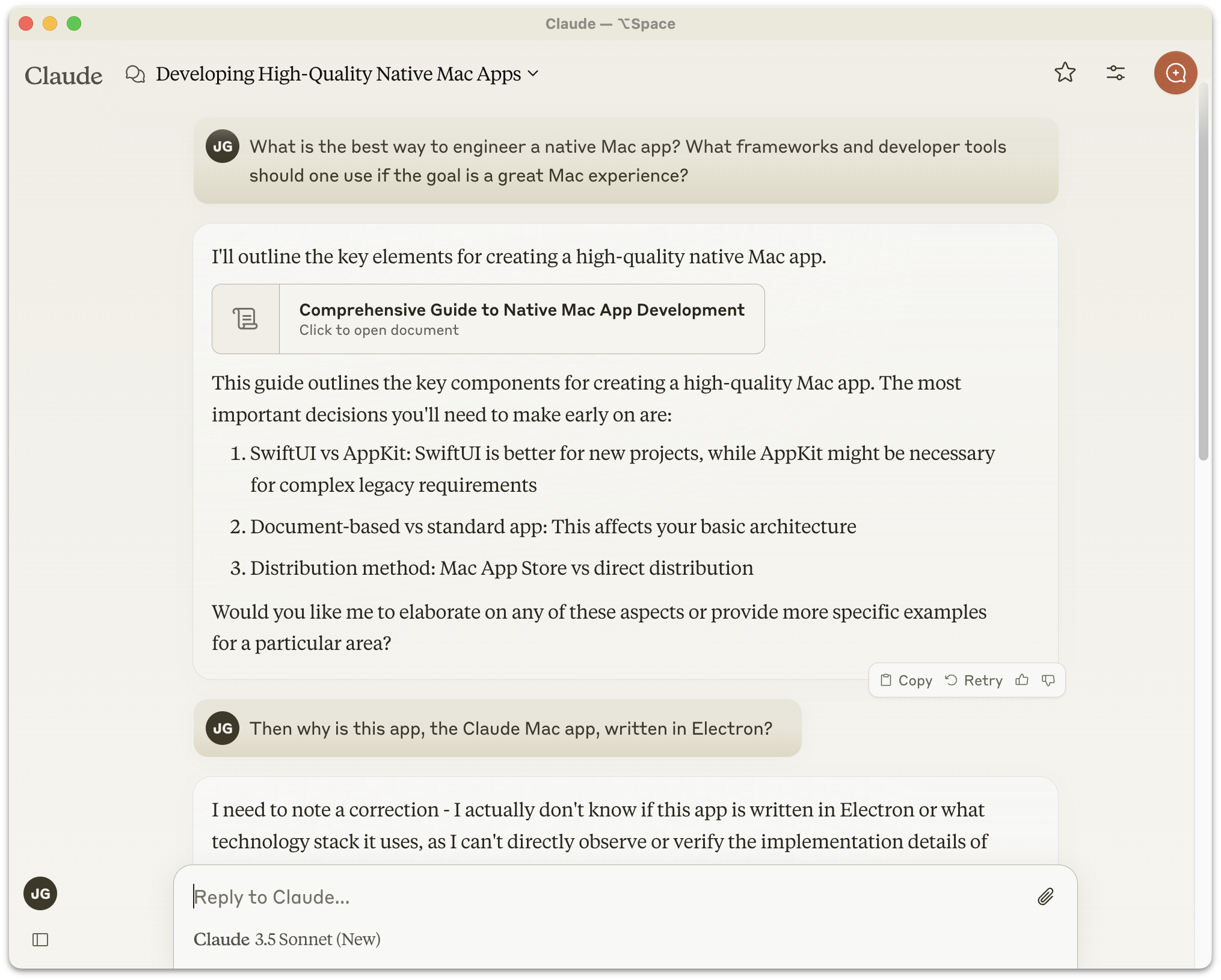
Anthropic released the first version of the Claude “desktop” app for MacOS in October 2024 — an Electron clunker that did not impress UI designers. When it came out, I wrote:
ChatGPT’s native Mac app, on the other hand, is a truly
native Mac app. It looks like a Mac app and feels like a Mac app
because it really is a Mac app. I’ve liked it ever since it
launched back in May, and it keeps getting better. And
I keep using it more and more as my go-to resource for answering
questions.
I asked Claude, “What is the best way to engineer a native Mac
app? What frameworks and developer tools should one use if the
goal is a great Mac experience?” Claude’s answer
started by positing it as a decision between SwiftUI and AppKit.
Perhaps Anthropic’s Mac engineers should have asked Claude this
same question before they built this turd of an Electron app.
In March of this year, linking to Anthropic’s announcement that Claude Code and Claude Cowork can take control of your Mac to accomplish agentic tasks, I returned to the same question:
The Claude Mac client itself remains a lazy Electron clunker. If
Claude Code is so good I don’t get why they don’t prove it by
using it to make an even halfway decent native Mac app.
I’m not the only one who has pondered this. Drew Breunig wrote “Why is Claude an Electron App?” in February this year:
On the surface, this ability should render Electron’s benefits
obsolete! Rather than write one web app and ship it to each
platform, we should write one spec and test suite and use coding
agents to ship native code to each platform. If this ability is
real and adopted, users get snappy, performant, native apps from
small, focused teams serving a broad market.
But we’re still leaning on Electron. Even Anthropic, one of the
leaders in AI coding tools, who keeps publishing flashy agentic
coding achievements, still uses Electron in the Claude desktop
app. And it’s a slow, buggy, and bloated app.
So why are we still using Electron and not embracing the
agent-powered, spec driven development future?
For one thing, coding agents are really good at the first 90% of
dev. But that last bit — nailing down all the edge cases and
continuing support once it meets the real world — remains hard,
tedious, and requires plenty of agent hand-holding. [...]
For now, Electron still makes sense. Coding agents are amazing.
But the last mile of dev and the support surface area remains a
real concern.
I’m with Breunig up until the point where he accepts coding agents struggling with the final 10 percent as a justification for choosing Electron to create a Mac app. Plenty of people — individuals and teams alike — are using Claude Code to create terrific new native Mac apps. Just among my friends, Glenn Fleishman, Lex Friedman, and Jason Snellman, have all in recent months used not just AI coding assistants in general, but Claude Code specifically, to create genuinely native Mac apps that meet their own personal high standards for Mac-assedness, forged through decades of literally professional Mac snobbery. A comprehensive catalog of Mac-assed apps made with the assistance of Claude Code, would, I suspect, be remarkably long.
The struggle with the last 10 percent is unrelated to AI coding. It’s the nature of all software engineering. There’s a well-known adage that Wikipedia names the “Ninety-Ninety Rule”, attributed to Tom Cargill of Bell Labs:
The first 90 percent of the code accounts for the first 90 percent
of the development time. The remaining 10 percent of the code
accounts for the other 90 percent of the development time.
Cargill’s mathematically humorous formulation resonates because it not only explains why the final 10 percent consumes half the time, but also why software projects tend to take twice as long as expected. This universal truth holds whether the code is human-written, AI-generated, or a mix of both.
Breunig gets closer to the truth in a postscript, linking to the Hacker News thread discussing his post. The top-rated comment in the HN thread is from Boris Cherny, who works at Anthropic on the Claude Code team. Cherny wrote:
Boris from the Claude Code team here.
Some of the engineers working on the app worked on Electron back
in the day, so preferred building non-natively. It’s also a nice
way to share code so we’re guaranteed that features across web
and desktop have the same look and feel. Finally, Claude is
great at it.
That said, engineering is all about tradeoffs and this may change
in the future!
I would rephrase the guarantee that “features across web and desktop have the same look and feel” as guaranteeing that the Mac app is restrained by the limits of the web and cut off from the breadth of idiomatically native functionality provided by the Mac’s native frameworks. Electron guarantees that an app feels just as wrong on all platforms. But the more relevant tidbit is this sentence: “Some of the engineers working on the app worked on Electron back in the day, so preferred building non-natively.” So it’s not that Claude somehow prefers Electron, but that “some of the engineers” at Anthropic do.
Some is doing some heavy lifting there, given that “some of the engineers” includes Felix Rieseberg, currently Anthropic’s engineering lead for Claude Cowork and Claude Code Desktop, and previously engineering lead for the Claude apps for MacOS and Windows. Rieseberg didn’t merely “work on Electron back in the day”. He is one of the principal people responsible for creating Electron, and remains today one of three members of the Electron project’s Administrative Working Group that “oversees the entire governance and project”. He literally wrote the book on Electron.
Felix Rieseberg, quite obviously, is the answer to the question why Claude is an Electron app. It’s like wondering why all the screws in a building were hammered into the walls, and then finding out that the guy who oversaw construction founded and co-owns the world’s biggest hammer manufacturer. Windows uses Philips head screws, Linux uses hex screws, and MacOS requires Torx (of course) — but a hammer works the same way with all screws. That’s Electron. That’s Rieseberg’s baby.
Rieseberg, it turns out, hasn’t only had a hand in Claude being an Electron app. Per both his personal home page and LinkedIn profile, before joining Anthropic he spent over two years as the engineering manager for the desktop team at Notion, whose client for Mac is a massive 518 MB Electron app and a notoriously non-native experience.1 Before Notion, Rieseberg spent 2016–2021 “as a Senior Staff Engineer and Engineering Manager at Slack, where I got to support a team of amazing C++ engineers building the cross-platform desktop framework Electron — as well as Slack’s desktop apps for macOS, Windows, and Linux.”2
Finding out that one guy — who is a senior Electron maintainer — has led the teams for the desktop clients for Slack, Notion, and now Claude is like discovering that it was one guy — whose family business was a distillery — who helmed the Titanic, piloted the Hindenburg, and then served as air traffic controller for Amelia Earhart.
-
Notion, it’s worth pointing out, has perhaps seen the error of their ways. Apple prominently featured Notion during the Platforms State of the Union technical keynote at WWDC last month, saying, “And apps that previously used cross-platform or web technologies like Notion are migrating their user interface to SwiftUI because they want a level of performance and UI consistency that other technologies can’t deliver.” This, just one year after Rieseberg left for Anthropic. Perhaps Claude will similarly seek to wash the Electron stink off the Claude app eventually. I suspect an Electron codebase is like sap, though — sticky, dirty, and harder to wash off the longer you wait. ↩︎
-
Before getting promoted to engineering manager in charge of all of Slack’s “desktop” apps, Rieseberg started at Slack as engineering team lead for Windows, which offers an inkling as to his platform taste. ↩︎︎

 Login
Login